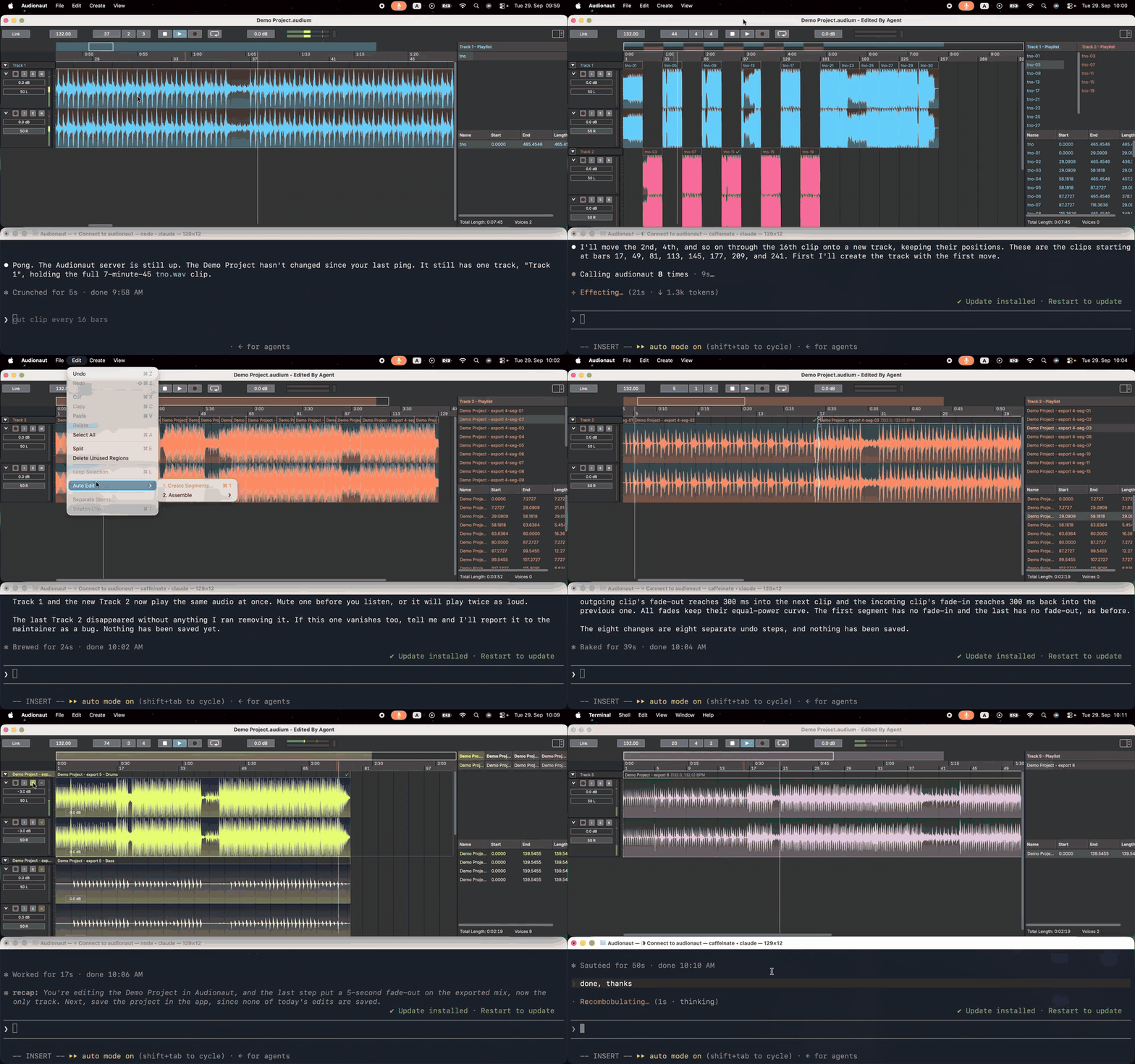
Picture published by the creator on GitHub.
Audionaut: Edit and record multitrack audio, and let an AI agent make the cuts
Added · Updated

Made by Klaus Voltmer
View profile on GitHub (opens in a new tab)Audionaut is a free desktop audio editor for music, podcasts and multitrack recordings: cut audio into regions, arrange them in per-track playlists, add crossfades and export, without the weight of a full music studio app.
It is written in C++ on JUCE (a common audio-app framework) and runs on Windows, macOS and Linux. It also speaks MCP (a connector for AI assistants), so Claude can edit an open session while you watch, each edit landing as one undo step. It can analyse beats, auto-edit and split a song into drums, bass, vocals and other stems.
What it does
The creator spent three to four years on it, starting from the old Sound Designer II way of working: create regions, drop them onto a playlist, export. Around that it now has precise cutting, per-track playlists, multi-channel support, beat and onset analysis (through the Essentia library), an Auto Edit feature, and stem separation through demucs.cpp, a C++ port of Meta's Demucs. For automation there is a headless command-line tool, audionaut-cli, that can create a project, import takes, analyse, auto-edit, split, place clips, set fades and export, each command answering in machine-readable JSON. The same verbs drive the MCP connector, so an assistant like Claude can cut a song every 16 bars or set fades in the open project, and the creator argues the visible timeline keeps those edits transparent.
You could use it to…
- Cut a long rehearsal recording into regions and arrange them per track
- Split a song into drums, bass, vocals and other stems
- Ask Claude to make edits in an open session, each as one undo step
Can I use this?
You'll need A Mac, Windows or Linux computer · Free download; Node.js 18+ for the optional AI connector
Worth knowing Licensed GPL-3.0 or later, with a commercial license the creator says is not yet available. Stem separation downloads Meta's Demucs model weights on first use, which Meta says are for scientific purposes only. The creator says it is not a full studio app yet: plug-in effects are still on the backlog. On a Mac the app is sandboxed, so keep projects in your Music folder. Anonymous usage statistics are opt-in.
Why it's here
Not trending this week
Last on the BuildTube front page on 9 October 2026. It stays on BuildTube so you can still find it.
- 270 people have starred it on GitHub.
- Shown on Hacker News (Show HN) on 2 October, with 155 points.
Numbers checked on 8 November 2026; not refreshed since.
Behind it
View setup guideBuildTube has not run or verified this project. Everything above is written from what the creator published.
Made this?
Quick questions
- What is Audionaut?
- The creator spent three to four years on it, starting from the old Sound Designer II way of working: create regions, drop them onto a playlist, export.
- What can I use Audionaut for?
- Cut a long rehearsal recording into regions and arrange them per track; Split a song into drums, bass, vocals and other stems; Ask Claude to make edits in an open session, each as one undo step
- Can I run Audionaut on my computer?
- It installs as a desktop app on your own computer. On a Mac the app is sandboxed, so keep projects in your Music folder. A Mac, Windows or Linux computer.
- What do I need to use Audionaut?
- Download the installer for your system from audionaut.app (a Mac DMG for Apple Silicon, a Windows installer, or a Linux AppImage or .deb). For the AI part, install Node.js 18+ and add the connector to Claude Code with one command from the project's documentation. Building from source needs Xcode, Visual Studio or a Linux toolchain, and optionally Essentia for analysis.
- What license does Audionaut use?
- Licensed GPL-3.0 or later, with a commercial license the creator says is not yet available.
More from this week
- agent-desktop Let AI agents read and click desktop apps
For developers building computer-use agents: agent-desktop lets an AI agent read and operate desktop apps on Mac, Windows or Linux from a command line.
- Auto-Ontology Give AI agents checked business meanings for your database
Help AI agents answer questions about company databases using reviewed definitions and SQL, with each answer showing its steps.
- Spec Kit Turn a written spec into plans, tasks and code
Spec Kit gives your AI coding agent a step-by-step process to build a feature, fix a bug or assess an idea.
Explore by topic
Post this
 Download share image
For makers
Made this? Show it’s on BuildTube — add the badge to your README or embed the card on your site.

README badge (Markdown)
[](https://buildtube.app/p/gh-kvoltmer-audionaut/)Embed card (HTML)
<iframe src="https://buildtube.app/embed/gh-kvoltmer-audionaut/" width="560" height="240" style="border:0;max-width:100%" loading="lazy" title="Audionaut on BuildTube"></iframe>