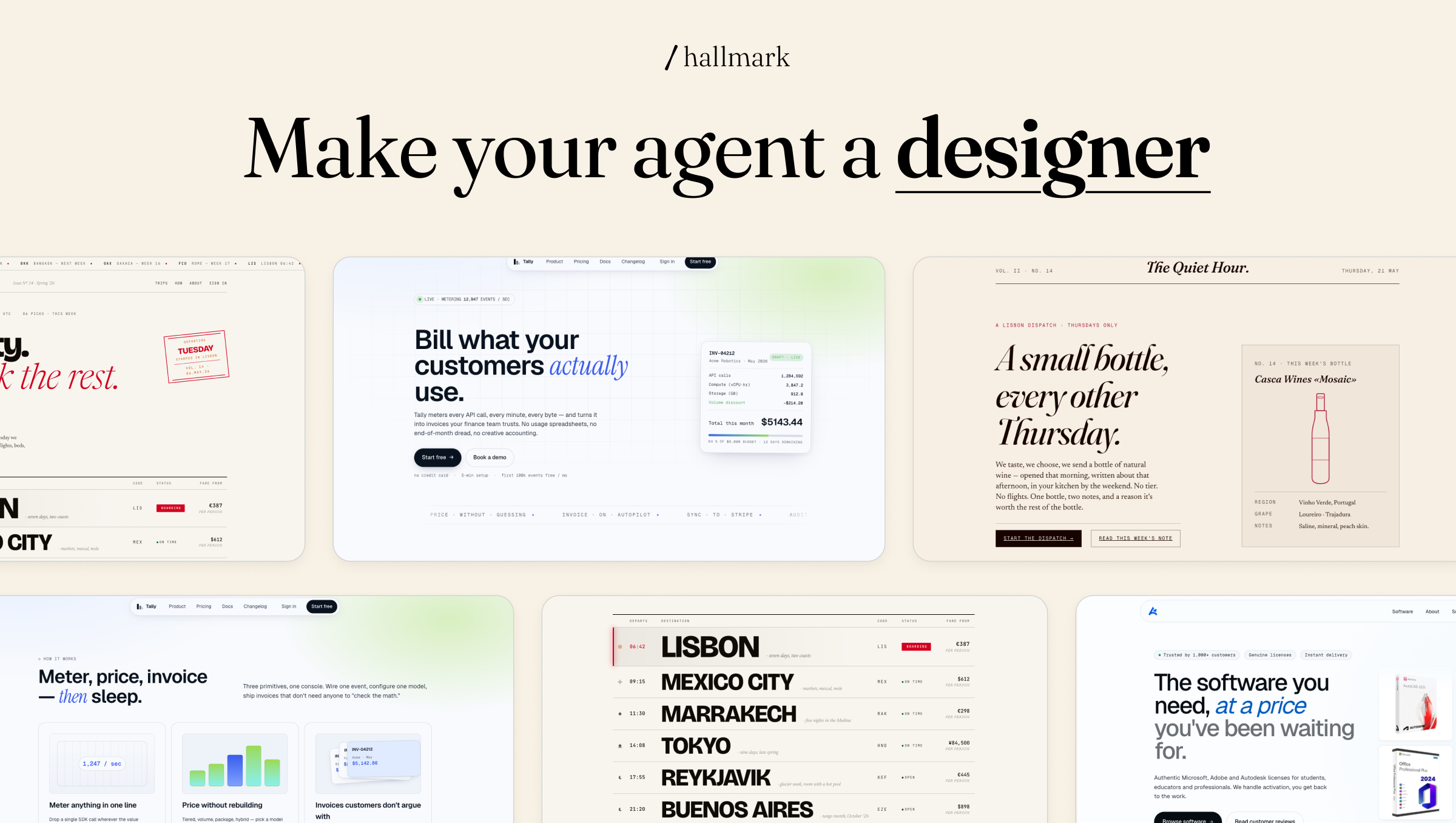
Picture published by the creator on GitHub.
Hallmark: Make AI-built web pages look less generic and template-like
Added · Updated

Made by Hassan El Mghari
View profile on GitHub (opens in a new tab)Have your coding assistant build or audit web pages that avoid the usual AI look.
For people who make sites with Claude Code, Cursor or Codex.
What it does
Hallmark is a skill (a packaged set of instructions an AI coding assistant follows) made by Together AI. For each brief, it picks a page layout plan the creators call a macrostructure, applies one of twenty-one visual themes, and runs 57 checks against common AI design habits, which the creators call slop-test gates, before handing the page back. When no theme fits, it switches to a Custom mode that designs palette, type and layout from scratch.
How to use it
Input → action → output: describe the page you want to your assistant, for example a menu for a tea shop, and Hallmark guides it to produce a self-contained HTML and CSS page. Three extra verbs change the job: audit scores existing code and returns a punch list without editing, redesign keeps your copy and brand but rebuilds the structure, and study pulls the type pairing and colour anchor out of a design you admire.
Common use cases
- Ask for a landing page for a small honey farm and get a single HTML and CSS page with its own layout and theme.
- Run hallmark audit on an existing site's code and get a punch list of generic design patterns, with no files changed.
- Point hallmark study at a design you like and get its layout, type pairing and colour anchor, optionally as a design.md file.
Can I use this?
Requirements Run npx skills add nutlope/hallmark, or copy SKILL.md and the references folder into ~/.claude/skills/hallmark/ for Claude Code, .cursor/rules/hallmark.mdc for Cursor, or a .codex/skills/hallmark/ folder for Codex. Re-running the install updates it. MIT licensed, so it is open source.
Caveat The creators show example pages, but how close your result gets depends on the assistant and model running the rules.
Worth knowing It is a set of written rules for an assistant, so results depend on the assistant and model you use. The study verb refuses pixel clones and paid templates.
Why it's here
- 6,624 people starred it on GitHub this week — 50,641 in total.
Numbers as of 8 November 2026, from BuildTube’s latest daily refresh.
Behind it
View sourceBuildTube has not run or verified this project. Everything above is written from what the creator published.
Made this?
Quick questions
- What is Hallmark?
- Hallmark is a skill (a packaged set of instructions an AI coding assistant follows) made by Together AI.
- What can I use Hallmark for?
- Ask for a landing page for a small honey farm and get a single HTML and CSS page with its own layout and theme; Run hallmark audit on an existing site's code and get a punch list of generic design patterns, with no files changed; Point hallmark study at a design you like and get its layout, type pairing and colour anchor, optionally as a design.md file
- Can I run Hallmark on my computer?
- Hallmark is a skill pack: it runs inside Claude Code, Cursor or Codex on your own computer, with no separate app.
- What do I need to use Hallmark?
- Claude Code, Cursor or Codex, plus a way to add the skill: a one-line npx command or copying the skill files into the assistant's skills folder.
- What license does Hallmark use?
- MIT licensed, so it is open source.
More from this week
- gstack Turn Claude Code into a virtual engineering team
Review code, test in a real browser and ship code changes with typed commands in your coding agent.
- Garden Skills Give your coding agent video and web design skills
Install ready-made skills so Claude Code, Cursor or Codex can make short videos, web pages and articles.
- agent-desktop Let AI agents read and click desktop apps
For developers building computer-use agents: agent-desktop lets an AI agent read and operate desktop apps on Mac, Windows or Linux from a command line.
Explore by topic
Post this
 Download share image
For makers
Made this? Show it’s on BuildTube — add the badge to your README or embed the card on your site.

README badge (Markdown)
[](https://buildtube.app/p/gh-nutlope-hallmark/)Embed card (HTML)
<iframe src="https://buildtube.app/embed/gh-nutlope-hallmark/" width="560" height="240" style="border:0;max-width:100%" loading="lazy" title="Hallmark on BuildTube"></iframe>