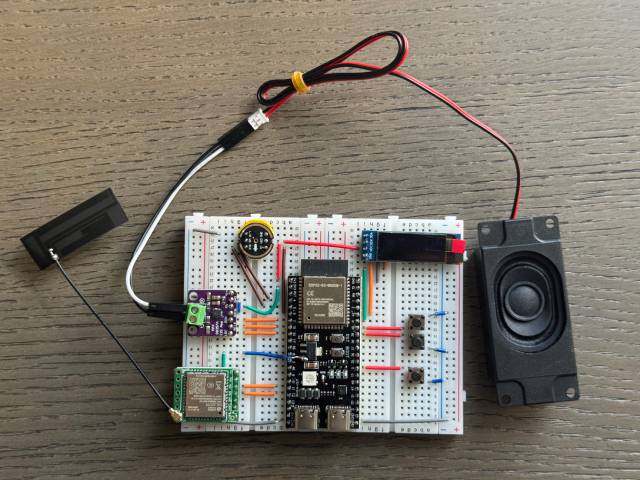
Picture published by the creator on GitHub.
xiaozhi-esp32: build a talking AI voice assistant on a small ESP32 board
Added · Updated

Made by Xiaoxia
View profile on GitHub (opens in a new tab)Flash firmware onto an ESP32 board and talk to an AI that can answer and control lights or servos.
For makers who build their own gadgets.
What it does
The firmware turns an ESP32 (a small, Wi-Fi capable chip used in hobby electronics) into a voice front end for large language models such as Qwen or DeepSeek. It listens for a wake word offline, streams your speech to a server, and plays back the spoken reply, with optional emoji faces on a screen. It uses MCP (a way to plug tools into an AI) so the AI can switch device parts like LEDs, speakers and servos, and, through the server, reach smart home control, email or search.
How to use it
Input → action → output: flash the ready-made firmware onto a supported board, connect it to Wi-Fi, say the wake word and ask a question. The board answers out loud, and if you ask it to, it can turn on an LED or move a servo wired to it.
Common use cases
- Wire a microphone, speaker and screen to an ESP32-S3 on a breadboard, flash the firmware, and get a desk gadget you can chat with by voice.
- Connect a servo or LED, then say a command and see the device move or light up through device-side MCP.
- Change the wake word, fonts, emojis and chat background in the web editor and load them onto your board.
Can I use this?
Requirements Beginners can flash the prebuilt firmware without a development setup. Developers install the ESP-IDF plugin in Cursor or VS Code; the creators recommend ESP-IDF 6.1 and say Linux compiles faster than Windows. The project lists 138 board directories and 171 build variants. MIT licensed.
Caveat The creators say personal users can register on xiaozhi.me to use the Qwen real-time model for free. Model settings for official-server devices are changed in the xiaozhi.me console. Main tutorials are hosted on Feishu and Bilibili.
Worth knowing By default your voice goes through the official xiaozhi.me server. ESP-IDF 5.x is no longer supported. Self-hosting a server is a separate setup.
Why it's here
Not trending this week
Last seen on the GitHub trending list on 22 October 2026. It stays on BuildTube so you can still find it.
- 32,879 people have starred it on GitHub.
Numbers checked on 8 November 2026; not refreshed since.
Behind it
View setup guideBuildTube has not run or verified this project. Everything above is written from what the creator published.
Made this?
Quick questions
- What is xiaozhi-esp32?
- The firmware turns an ESP32 (a small, Wi-Fi capable chip used in hobby electronics) into a voice front end for large language models such as Qwen or DeepSeek.
- What can I use xiaozhi-esp32 for?
- Wire a microphone, speaker and screen to an ESP32-S3 on a breadboard, flash the firmware, and get a desk gadget you can chat with by voice; Connect a servo or LED, then say a command and see the device move or light up through device-side MCP; Change the wake word, fonts, emojis and chat background in the web editor and load them onto your board
- Can I run xiaozhi-esp32 on my computer?
- xiaozhi-esp32 runs on a supported ESP32 board with a microphone and speaker, not on your computer; by default the board connects to the official xiaozhi.me server, where personal users can register an account to use the Qwen real-time model for free, and self-hosting a server is a separate setup. Developers install the ESP-IDF plugin in Cursor or VS Code; the creators recommend ESP-IDF 6.1 and say Linux compiles faster than Windows.
- What do I need to use xiaozhi-esp32?
- A supported ESP32 board with a microphone and speaker. Ready-made firmware connects to the official xiaozhi.me server by default; personal users can register an account there to use the Qwen real-time model for free. Building from source needs ESP-IDF v6.0.1 or later.
- What license does xiaozhi-esp32 use?
- MIT licensed.
More from this week
- agent-desktop Let AI agents read and click desktop apps
For developers building computer-use agents: agent-desktop lets an AI agent read and operate desktop apps on Mac, Windows or Linux from a command line.
- OpenBot Run AI coworkers with their own browser and files
Give an AI coworker a job, connect the tools it needs and watch it work.
- Stroq Check AI coding agent sessions for leaked keys
Stroq scans your recent Claude Code and Codex sessions for keys that left your machine.
Explore by topic
Post this
 Download share image
For makers
Made this? Show it’s on BuildTube — add the badge to your README or embed the card on your site.

README badge (Markdown)
[](https://buildtube.app/p/gh-78-xiaozhi-esp32/)Embed card (HTML)
<iframe src="https://buildtube.app/embed/gh-78-xiaozhi-esp32/" width="560" height="240" style="border:0;max-width:100%" loading="lazy" title="xiaozhi-esp32 on BuildTube"></iframe>