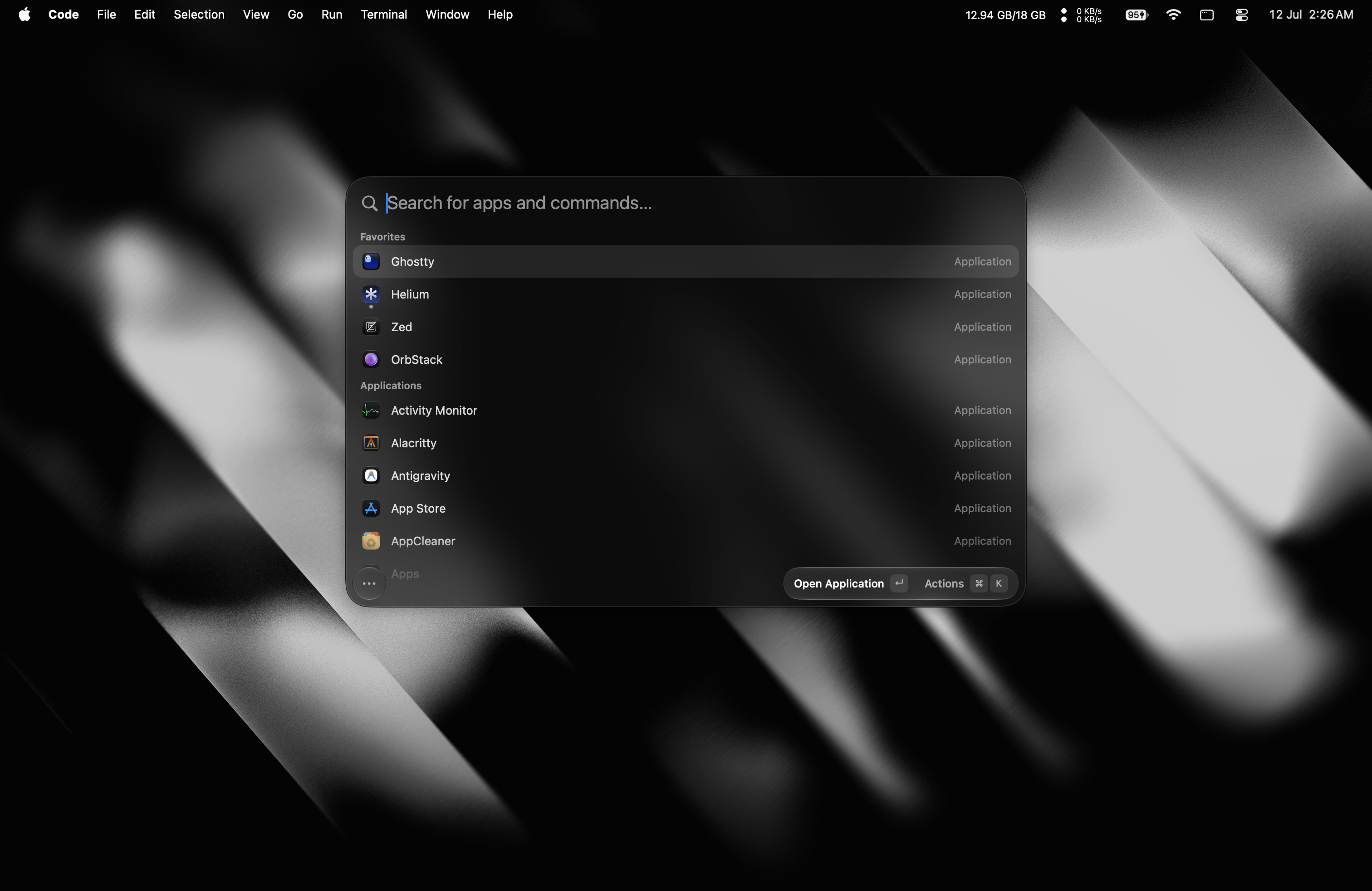
Picture published by the creator on GitHub.
Tinycast: Open a Mac launcher that stays under 100 MB of memory
Added · Updated

Made by Abue Ammar
View profile on GitHub (opens in a new tab)A keyboard launcher for macOS: one hotkey opens a search box that finds apps, files, clipboard history, snippets, emoji, calculator answers and window-arranging commands.
It is written directly against Apple’s own frameworks with no outside dependencies and no Electron, and the project holds every change to a budget of under 100 MB of memory. It can also run extensions written for Raycast, drawing them as native interface rather than a web view. The project says there is no telemetry and that every AI feature is switched off until you turn it on.
What it does
The point of a launcher is that one keystroke replaces hunting through menus and folders. Tinycast covers the usual ground — fuzzy app search, per-app hotkeys that toggle an app in and out of focus, file search through Spotlight without building its own index, a searchable clipboard history for text and images, an inline calculator that also handles units and live currency — then keeps going into snippets with placeholders, custom shell commands, Apple Shortcuts, a plain-Markdown notes collection, an emoji grid, and thirty-four window-arranging actions in the style of Rectangle. What distinguishes it is the engineering constraint: SwiftUI and AppKit with zero third-party dependencies, and a contributing guide that holds every pull request to a memory budget and requires a before-and-after video for visual changes. Raycast extension support means the existing community library is available without the project rebuilding each one.
You could use it to…
- Open apps and files instantly with one hotkey
- Paste your clipboard history into what you're writing
- Run a Raycast extension without the extra memory overhead
Can I use this?
You'll need A Mac · Ready to use
Worth knowing macOS only, and several features — window management, pasting back into the app you were using, launching things — need accessibility and automation permissions you grant by hand. The feature set is deliberately closed: the contributing guide says requests are declined on the grounds that another launcher has a feature, so it may never add the one you miss. The source states the licence as AGPL-3.0 while GitHub does not recognise the licence file, so read it before reusing the code.
Why it's here
Not trending this week
Last seen on the GitHub trending list on 25 September 2026. It stays on BuildTube so you can still find it.
- 9,282 people have starred it on GitHub.
Numbers checked on 8 November 2026; not refreshed since.
Behind it
View setup guideBuildTube has not run or verified this project. Everything above is written from what the creator published.
Made this?
Quick questions
- What is Tinycast?
- The point of a launcher is that one keystroke replaces hunting through menus and folders.
- What can I use Tinycast for?
- Open apps and files instantly with one hotkey; Paste your clipboard history into what you're writing; Run a Raycast extension without the extra memory overhead
- Can I run Tinycast on my computer?
- It installs as a desktop app on your own computer. macOS only, and several features — window management, pasting back into the app you were using, launching things — need accessibility and automation permissions you grant by hand.
- What do I need to use Tinycast?
- A Mac. You install the app and grant the system permissions it asks for. The AI chat and text actions require your own key or an AI account you already have, and the project says they are off by default.
- What license does Tinycast use?
- The source states the licence as AGPL-3.0 while GitHub does not recognise the licence file, so read it before reusing the code.
More from this week
- agent-desktop Let AI agents read and click desktop apps
For developers building computer-use agents: agent-desktop lets an AI agent read and operate desktop apps on Mac, Windows or Linux from a command line.
- Auto-Ontology Give AI agents checked business meanings for your database
Help AI agents answer questions about company databases using reviewed definitions and SQL, with each answer showing its steps.
- Spec Kit Turn a written spec into plans, tasks and code
Spec Kit gives your AI coding agent a step-by-step process to build a feature, fix a bug or assess an idea.
Explore by topic
Post this
 Download share image
For makers
Made this? Show it’s on BuildTube — add the badge to your README or embed the card on your site.

README badge (Markdown)
[](https://buildtube.app/p/gh-abue-ammar-tinycast/)Embed card (HTML)
<iframe src="https://buildtube.app/embed/gh-abue-ammar-tinycast/" width="560" height="240" style="border:0;max-width:100%" loading="lazy" title="Tinycast on BuildTube"></iframe>