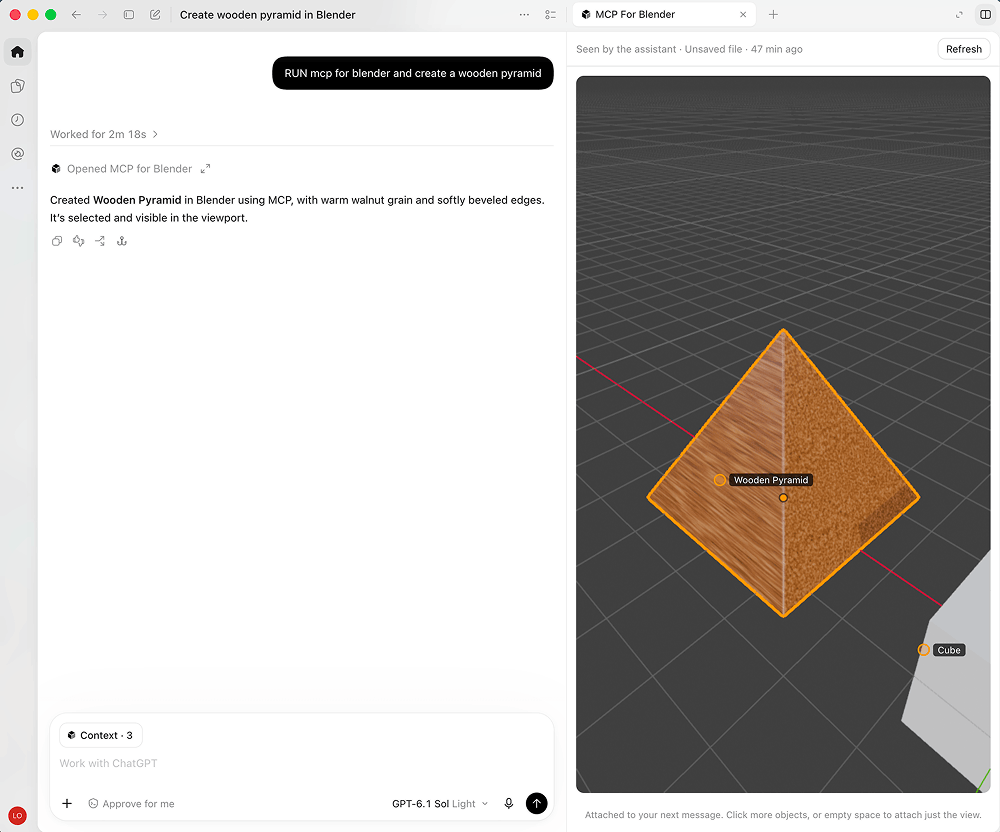
Picture published by the creator on GitHub.
mcp-for-blender: Build 3D scenes in Blender by chatting with an AI
Added · Updated

Made by ahujasid
View profile on GitHub (opens in a new tab)Ask an AI assistant to create, change and light 3D scenes inside Blender for you.
For people who make 3D art and want to model by describing it.
What it does
It has two parts. A Blender addon starts a small server inside Blender when you open it. An MCP server (MCP is a way to plug tools into an AI assistant) connects your AI app to that addon, so the AI can create, move and delete objects, change materials and colors, and write Blender Python directly. It can also take camera, wireframe and X-ray views and renders so the AI checks its own work, and pull assets from Poly Haven, Sketchfab and Poly Pizza.
How to use it
Input → action → output: you type a request in your AI app, such as a low-poly dungeon scene with a dragon guarding gold. The AI sends commands to Blender, and the objects, materials and lighting appear in your open Blender file, where you can keep editing by hand or ask for changes.
Common use cases
- Describe a beach scene in chat and get a Blender scene lit with an HDRI and filled with rocks and plants from Poly Haven.
- Give the AI a reference image and get a Blender scene built to match it, which you can then adjust yourself.
- Ask the AI to recolor or rearrange objects in an existing Blender file and see the changes appear in the viewport.
Can I use this?
Requirements One setup command for macOS, Linux or Windows installs uv if needed, finds the AI apps on your computer, lets you pick which to connect, and installs and enables the Blender addon. It keeps your existing settings and saves a backup of each file it changes. Then restart your AI app and open Blender. The code is MIT licensed, an open source license.
Caveat The creators say complex requests may need to be broken into smaller steps. A separate premium option exists for generating AI 3D models without your own API keys; the self-hosted addon works on its own.
Worth knowing Run only one copy of the server, from one AI app at a time. The AI can run any Python code inside Blender, so the creators advise saving your work first. It is a third-party tool, not made by Blender.
Why it's here
Not trending this week
Last seen on the GitHub trending list on 22 October 2026. It stays on BuildTube so you can still find it.
- 33,626 people have starred it on GitHub.
Numbers checked on 8 November 2026; not refreshed since.
Behind it
View setup guideBuildTube has not run or verified this project. Everything above is written from what the creator published.
Made this?
Quick questions
- What is mcp-for-blender?
- It has two parts.
- What can I use mcp-for-blender for?
- Describe a beach scene in chat and get a Blender scene lit with an HDRI and filled with rocks and plants from Poly Haven; Give the AI a reference image and get a Blender scene built to match it, which you can then adjust yourself; Ask the AI to recolor or rearrange objects in an existing Blender file and see the changes appear in the viewport
- Can I run mcp-for-blender on my computer?
- mcp-for-blender runs on your own computer (macOS, Linux or Windows), connecting Blender to an AI app that supports MCP, such as Claude Desktop, Claude Code or Cursor. One setup command for macOS, Linux or Windows installs uv if needed, finds the AI apps on your computer, lets you pick which to connect, and installs and enables the Blender addon.
- What do I need to use mcp-for-blender?
- Blender, Python, the uv package manager (minimum versions are listed in the source), and an AI app that supports MCP, such as Claude Desktop, Claude Code, Codex, Cursor or VS Code.
- What license does mcp-for-blender use?
- The code is MIT licensed, an open source license.
More from this week
- agent-desktop Let AI agents read and click desktop apps
For developers building computer-use agents: agent-desktop lets an AI agent read and operate desktop apps on Mac, Windows or Linux from a command line.
- Spec Kit Turn a written spec into plans, tasks and code
Spec Kit gives your AI coding agent a step-by-step process to build a feature, fix a bug or assess an idea.
- kimi-k3-in-c Run a 2.78-trillion-parameter model on 8 GB of RAM
Get text answers from the huge Kimi K3 AI model using one CPU and no graphics card.
Explore by topic
Post this
 Download share image
For makers
Made this? Show it’s on BuildTube — add the badge to your README or embed the card on your site.

README badge (Markdown)
[](https://buildtube.app/p/gh-ahujasid-mcp-for-blender/)Embed card (HTML)
<iframe src="https://buildtube.app/embed/gh-ahujasid-mcp-for-blender/" width="560" height="240" style="border:0;max-width:100%" loading="lazy" title="mcp-for-blender on BuildTube"></iframe>