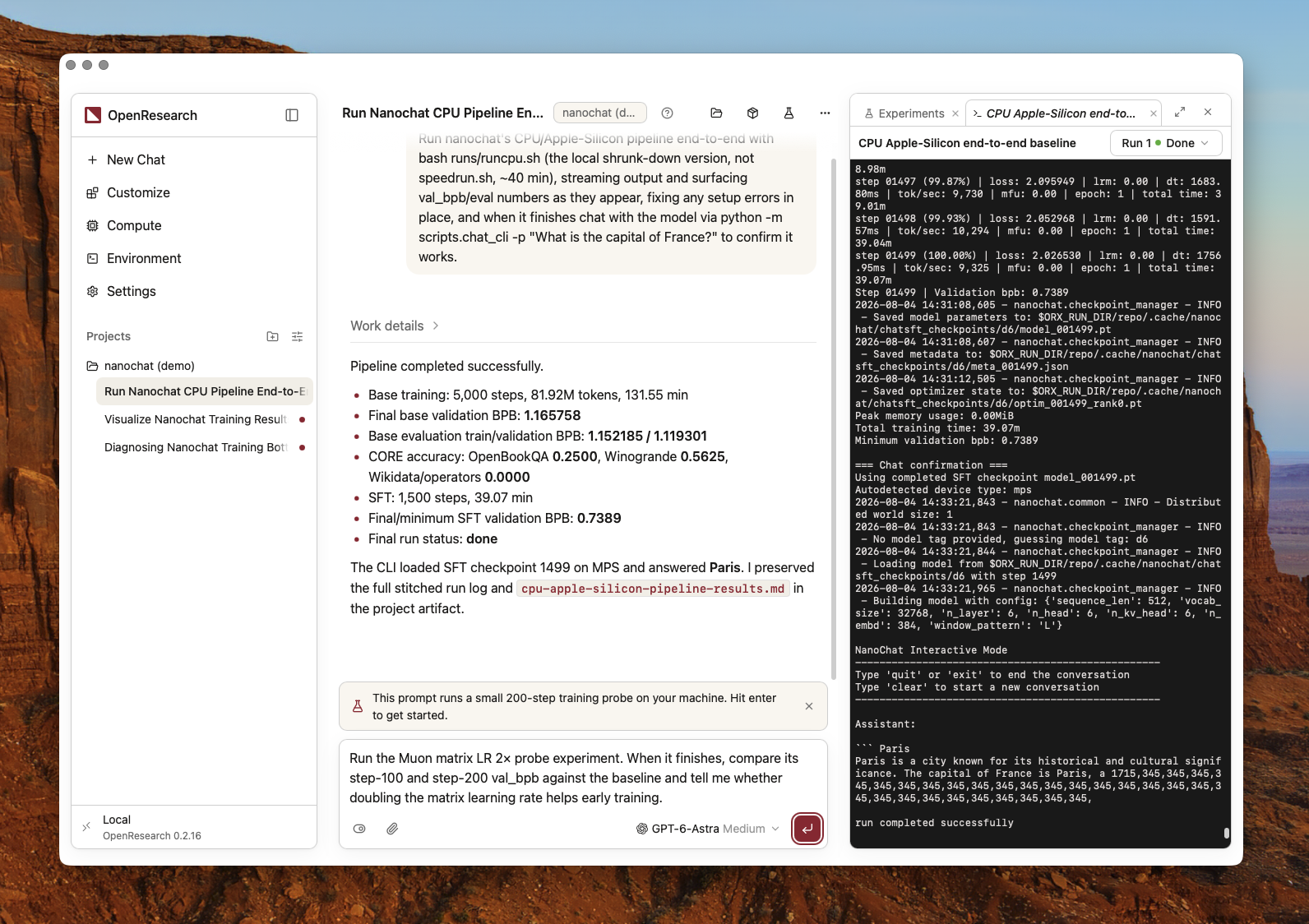
Picture published by the creator on GitHub.
OpenResearch: Point a coding agent at research and keep every experiment
Added · Updated

Made by alphaXiv
View profile on GitHub (opens in a new tab)A local workspace that turns coding agents such as Claude Code, Codex, OpenCode or Cursor into research assistants: reviewing literature, proposing a hypothesis, changing code, launching an experiment and deciding what to try next.
Everything runs on your own machine at a local address with a local database, so creating a project or launching a run does not publish your code. An experiment tree keeps the lineage when several agents explore different directions at once, and the same committed snapshot can be run locally, over SSH, or on a cluster or cloud GPU service.
What it does
The loop OpenResearch is built around is the one a researcher actually runs: have an idea, change the code, run the experiment, look at the evidence, decide the next move. It can run that loop autonomously — the project calls this autoresearch — and it can run several agents down different branches at once, with an experiment tree recording which run came from which. The second half is execution: the workspace holds a committed source snapshot, and that same snapshot can be launched locally, over SSH, or on Slurm, Kubernetes, Ray, Hugging Face Jobs, Modal, Tinker or the project’s managed compute, so the browser can stay on your laptop while the work happens next to remote GPUs. Local models through LM Studio, Ollama, MLX or a custom endpoint are supported alongside hosted ones.
You could use it to…
- Let a coding agent propose a change, run the experiment and report back
- Run several agents down different directions, tracked in an experiment tree
- Launch the same snapshot locally, over SSH or on a cluster
Can I use this?
You'll need macOS 11+ or Linux, plus a coding agent · Setup needed
Worth knowing One warning in the project’s own documentation is worth reading twice: when you run it on a remote machine the service listens on that machine’s loopback address with no login of its own, so anyone else with an account on that host can reach it. Windows support is described as beta and needs Git for Windows. Official release builds send coarse usage events tied to a random install id, which can be switched off; the project says they exclude code, prompts, file contents, paths and repository names. MIT licence.
Why it's here
Not trending this week
Last seen on the GitHub trending list on 20 September 2026. It stays on BuildTube so you can still find it.
- 7,988 people have starred it on GitHub.
Numbers checked on 8 November 2026; not refreshed since.
Behind it
View setup guideBuildTube has not run or verified this project. Everything above is written from what the creator published.
Made this?
Quick questions
- What is OpenResearch?
- The loop OpenResearch is built around is the one a researcher actually runs: have an idea, change the code, run the experiment, look at the evidence, decide the next move.
- What can I use OpenResearch for?
- Let a coding agent propose a change, run the experiment and report back; Run several agents down different directions, tracked in an experiment tree; Launch the same snapshot locally, over SSH or on a cluster
- Can I run OpenResearch on my computer?
- It runs from a terminal on your own computer. Windows support is described as beta and needs Git for Windows. macOS 11+ or Linux, plus a coding agent.
- What do I need to use OpenResearch?
- Install the command-line tool on macOS or Linux and run it; a dashboard opens on a local address in your browser. A supported coding agent does the actual work, and you connect either a local model or your own provider. An account on the project’s website is only needed for organisations and managed compute.
- What license does OpenResearch use?
- MIT licence.
More from this week
- agent-desktop Let AI agents read and click desktop apps
For developers building computer-use agents: agent-desktop lets an AI agent read and operate desktop apps on Mac, Windows or Linux from a command line.
- Auto-Ontology Give AI agents checked business meanings for your database
Help AI agents answer questions about company databases using reviewed definitions and SQL, with each answer showing its steps.
- Spec Kit Turn a written spec into plans, tasks and code
Spec Kit gives your AI coding agent a step-by-step process to build a feature, fix a bug or assess an idea.
Explore by topic
Post this
 Download share image
For makers
Made this? Show it’s on BuildTube — add the badge to your README or embed the card on your site.

README badge (Markdown)
[](https://buildtube.app/p/gh-alphaxiv-openresearch/)Embed card (HTML)
<iframe src="https://buildtube.app/embed/gh-alphaxiv-openresearch/" width="560" height="240" style="border:0;max-width:100%" loading="lazy" title="OpenResearch on BuildTube"></iframe>