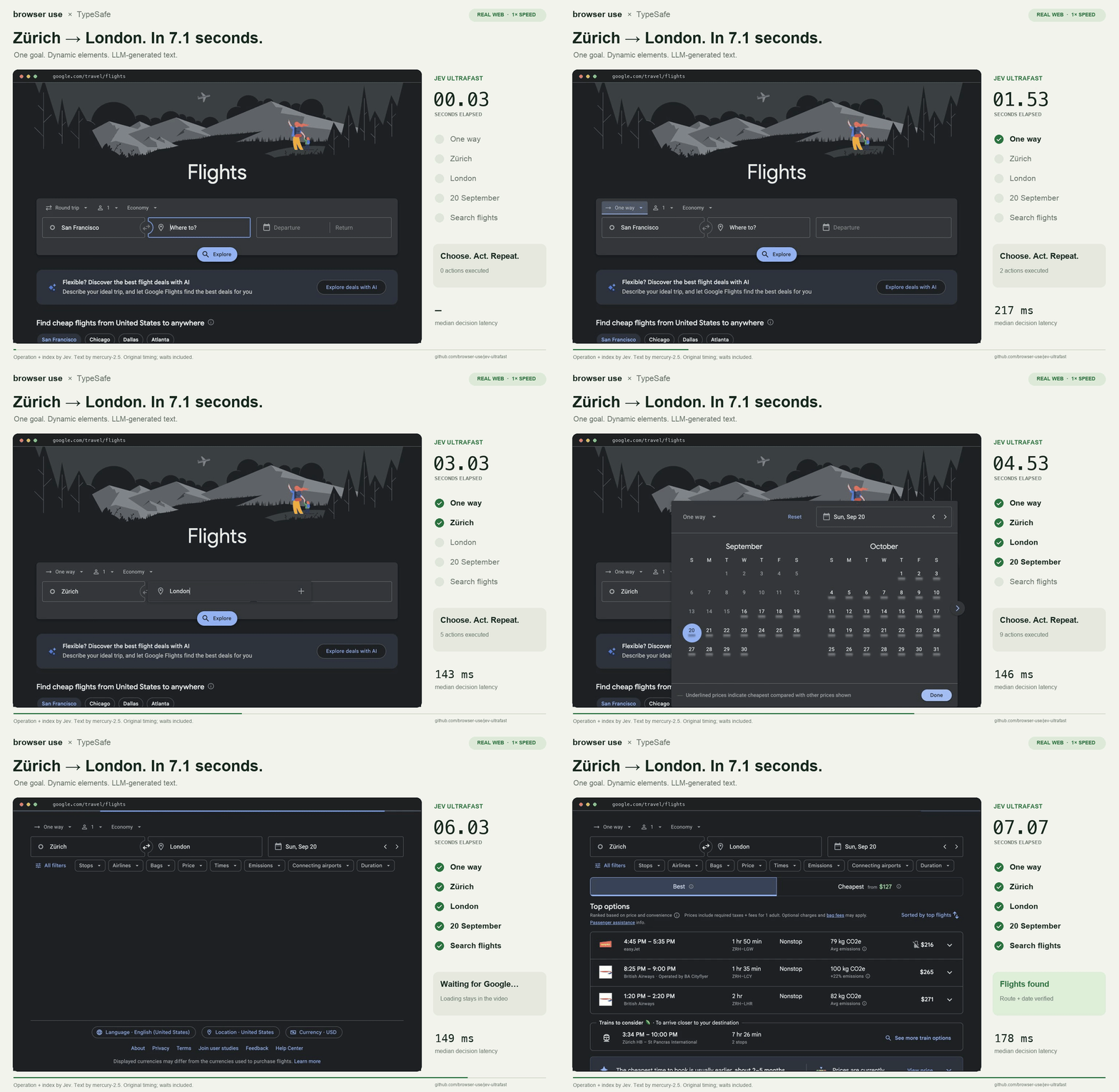
Picture published by the creator on GitHub.
jev-ultrafast: Watch an AI agent search Google Flights in about 7 seconds
Added

Made by Browser Use
View profile on GitHub (opens in a new tab)Jev Ultrafast is a browser-automation agent that completes a task like searching flights by reading the page, then asking Jev which button, field, or link to act on next — a decision that takes milliseconds instead of the seconds a normal chatbot needs to 'think' about it.
A small language model only steps in to type actual text, like a city name. In the project's own demo, a real Google Flights search from Zürich to London finishes in about 7.1 seconds end to end, loading waits included. It's a Python project from Browser Use, the company behind a widely used browser-automation toolkit, and needs API keys for Jev and an LLM provider.
What it does
The agent maintains a live 'action space' — a numbered table of every clickable, typable, or scrollable element currently on the page — and asks Jev to score which numbered element and which operation (click, type, select, scroll, wait, or declare the task done or blocked) best matches the goal. Because Jev returns a probability distribution instead of generated text, the agent can pick an action in one fast pass; a small separate language model is invoked only for the handful of steps that require writing actual words, like a destination city.
You could use it to…
- Watch an agent search real flights in about 7 seconds end to end
- Automate a repetitive browser task without a slow narrated click-by-click agent
- See Jev pick the exact button or field to act on next, instead of writing text
Can I use this?
You'll need Python, a terminal, and API keys for TypeSafe Jev and a language model · Setup needed
Worth knowing This is a research/demo project rather than a packaged app, and the speed and cost figures in the project's documentation are the creators' own measurements on their own tasks.
Why it's here
Added 25 September
New Sept 16 · 20,115 GitHub stars in 9 days
- 20,115 people have starred it on GitHub.
Numbers checked on 25 September 2026; not refreshed since.
Behind it
View setup guideBuildTube has not run or verified this project. Everything above is written from what the creator published.
Made this?
Quick questions
- What is jev-ultrafast?
- The agent maintains a live 'action space' — a numbered table of every clickable, typable, or scrollable element currently on the page — and asks Jev to score which numbered element and which operation (click, type, select, scroll, wait, or declare the task done or blocked) best matches the goal.
- What can I use jev-ultrafast for?
- Watch an agent search real flights in about 7 seconds end to end; Automate a repetitive browser task without a slow narrated click-by-click agent; See Jev pick the exact button or field to act on next, instead of writing text
- Can I run jev-ultrafast on my computer?
- It runs from a terminal on your own computer.
- What do I need to use jev-ultrafast?
- Python 3, the project's pip requirements, and API keys for TypeSafe (for Jev) and an LLM provider for the text-typing steps. Browser Use also lists a waitlisted hosted cloud version.
- What license does jev-ultrafast use?
- The source lists the MIT license (MIT), an OSI-approved open-source license. Read the license file on the source page for the full terms.
More from this week
- agent-desktop Let AI agents read and click desktop apps
For developers building computer-use agents: agent-desktop lets an AI agent read and operate desktop apps on Mac, Windows or Linux from a command line.
- Auto-Ontology Give AI agents checked business meanings for your database
Help AI agents answer questions about company databases using reviewed definitions and SQL, with each answer showing its steps.
- Spec Kit Turn a written spec into plans, tasks and code
Spec Kit gives your AI coding agent a step-by-step process to build a feature, fix a bug or assess an idea.
Explore by topic
Post this
 Download share image
For makers
Made this? Show it’s on BuildTube — add the badge to your README or embed the card on your site.

README badge (Markdown)
[](https://buildtube.app/p/gh-browser-use-jev-ultrafast/)Embed card (HTML)
<iframe src="https://buildtube.app/embed/gh-browser-use-jev-ultrafast/" width="560" height="240" style="border:0;max-width:100%" loading="lazy" title="jev-ultrafast on BuildTube"></iframe>