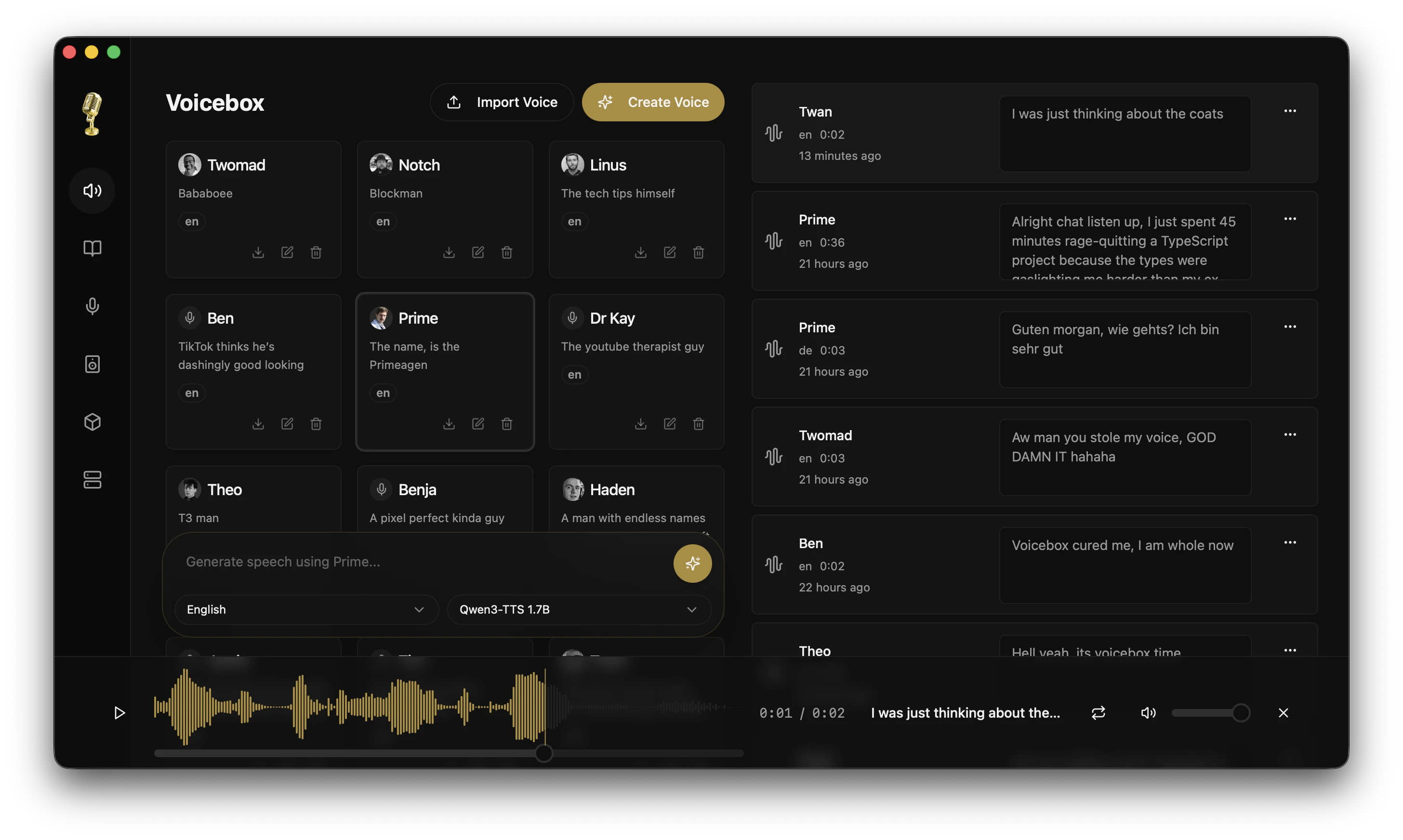
Picture published by the creator on GitHub.
Voicebox: Clone a voice, dictate anywhere, and give agents a voice
Added · Updated

Made by Jamie Pine
View profile on GitHub (opens in a new tab)A local voice studio that covers both halves of speech: going out and coming in.
It clones a voice from a short sample or uses more than fifty preset voices, generates speech in 23 languages across seven different engines, and adds effects and expressive tags. Coming the other way, a global hotkey dictates into any text field on your machine. It also exposes a single tool call over MCP, so an AI assistant that supports it can speak back to you in a voice you chose. The project says models, voice data and recordings never leave your machine.
What it does
Voicebox positions itself against two cloud products at once — one that handles speech output, one that handles dictation — and does both locally. On the output side it supports zero-shot cloning from a reference sample plus a library of preset voices, seven text-to-speech engines, 23 languages, post-processing effects such as pitch, reverb and compression, expressive tags like laughter or a sigh, automatic chunking with crossfades so a whole chapter can be read in one go, and a multi-track editor for conversations and podcasts. On the input side there is push-to-talk and toggle dictation with automatic pasting, plus an in-app microphone on any text field. Between them sits a bundled local language model that can compose, rewrite or respond, and voice profiles can carry a written persona that shapes how it writes.
You could use it to…
- Clone a voice from a short sample and read a chapter aloud
- Dictate into any text field with a global hotkey
- Have your AI assistant speak a summary back in a voice you chose
Can I use this?
You'll need A Mac, Windows or Linux computer · Setup needed
Worth knowing Running seven speech engines and a bundled language model locally is not free of hardware cost, and quality and speed vary by engine. Cloning a voice from a sample is exactly the capability that makes impersonation easy, so whose voice you clone matters legally as well as ethically. Which engines and languages are available in a given build is the project’s list, not a guarantee. MIT licence.
Why it's here
- 60,082 people have starred it on GitHub.
Numbers as of 8 November 2026, from BuildTube’s latest daily refresh.
Behind it
View setup guideBuildTube has not run or verified this project. Everything above is written from what the creator published.
Made this?
Quick questions
- What is Voicebox?
- Voicebox positions itself against two cloud products at once — one that handles speech output, one that handles dictation — and does both locally.
- What can I use Voicebox for?
- Clone a voice from a short sample and read a chapter aloud; Dictate into any text field with a global hotkey; Have your AI assistant speak a summary back in a voice you chose
- Can I run Voicebox on my computer?
- It installs as a desktop app on your own computer. Running seven speech engines and a bundled language model locally is not free of hardware cost, and quality and speed vary by engine. A Mac, Windows or Linux computer.
- What do I need to use Voicebox?
- A desktop computer and the app from the project’s downloads. Voice cloning needs a short clean recording of the speaker. Agent speech needs an assistant that supports MCP tools, such as Claude Code, Cursor or Cline.
- What license does Voicebox use?
- MIT licence.
More from this week
- Spec Kit Turn a written spec into plans, tasks and code
Spec Kit gives your AI coding agent a step-by-step process to build a feature, fix a bug or assess an idea.
- RAGFlow Ask questions about your documents and get cited answers
Upload documents and ask questions with traceable citations.
- agent-desktop Let AI agents read and click desktop apps
For developers building computer-use agents: agent-desktop lets an AI agent read and operate desktop apps on Mac, Windows or Linux from a command line.
Explore by topic
Post this
 Download share image
For makers
Made this? Show it’s on BuildTube — add the badge to your README or embed the card on your site.

README badge (Markdown)
[](https://buildtube.app/p/gh-jamiepine-voicebox/)Embed card (HTML)
<iframe src="https://buildtube.app/embed/gh-jamiepine-voicebox/" width="560" height="240" style="border:0;max-width:100%" loading="lazy" title="Voicebox on BuildTube"></iframe>