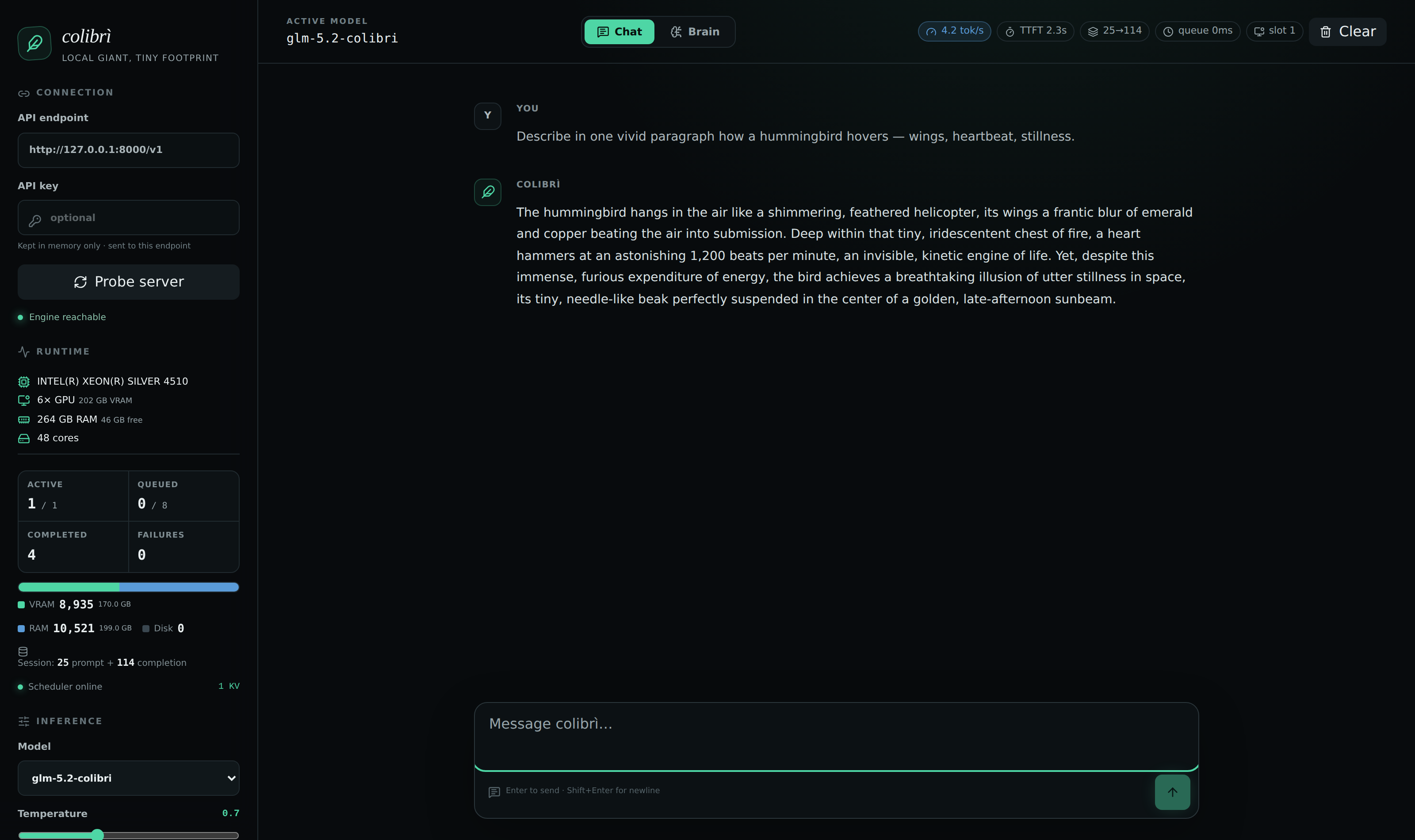
Picture published by the creator on GitHub.
colibri: Run huge mixture-of-experts models by streaming them from disk
Added · Updated

Made by Vincenzo Fornaro
View profile on GitHub (opens in a new tab)An inference engine written in plain C that tries to run very large models — hundreds of billions to trillions of parameters — on hardware that could not normally hold them.
It treats graphics memory, system memory and your drive as one tiered pool and moves parts of the model between them as they are needed. That only works because these are mixture-of-experts models, where a small slice of the network handles each word and the rest sits idle. Nine model families are supported, one C file each, behind a shared chat, server and web interface. The project describes itself as a research platform as much as a tool.
What it does
A mixture-of-experts model is built from many specialist sub-networks, and only a handful handle any given word, so most of the model is idle at any moment. Colibrì builds its whole design around keeping those idle parts on disk and fetching them when routing calls for them, which it calls memory multitiering: graphics memory, system memory and storage form one hierarchy, and the engineering goes into placement, scheduling and overlapping fetches with computation. It is pure C with no engine dependencies, one file per model family, and ships a terminal chat, a server and a web dashboard. The dashboard is unusually visual for an inference engine — it shows which storage tier each expert sits in, which experts lit up during a turn, and a measured map of the topics different experts specialise in.
You could use it to…
- Run a frontier-sized open model on hardware you already own
- Chat with a huge mixture-of-experts model through a web interface
- Watch live metrics on a dashboard while the model runs
Can I use this?
You'll need A capable desktop, fast storage, and a C toolchain · Setup needed
Worth knowing The project is explicit that it makes no promise about speed: with too little fast memory it simply gets slower. Its headline demonstration — a 744-billion-parameter model at about 4 tokens a second — was measured on six RTX 5090 cards, which is not consumer hardware in any ordinary sense. What it does guarantee is that it will never quietly reduce the model’s precision or change its routing to make something fit. Every performance figure here is the project’s own. Apache 2.0. Licensed under Apache License 2.0.
Why it's here
Getting attention on GitHub this week
- 3,394 people starred it on GitHub this week — 48,916 in total.
Numbers as of 8 November 2026, from BuildTube’s latest daily refresh.
Behind it
View setup guideBuildTube has not run or verified this project. Everything above is written from what the creator published.
Made this?
Quick questions
- What is colibri?
- A mixture-of-experts model is built from many specialist sub-networks, and only a handful handle any given word, so most of the model is idle at any moment.
- What can I use colibri for?
- Run a frontier-sized open model on hardware you already own; Chat with a huge mixture-of-experts model through a web interface; Watch live metrics on a dashboard while the model runs
- Can I run colibri on my computer?
- It runs from a terminal on your own computer. Its headline demonstration — a 744-billion-parameter model at about 4 tokens a second — was measured on six RTX 5090 cards, which is not consumer hardware in any ordinary sense.
- What do I need to use colibri?
- A C toolchain to build it, fast storage because the model is streamed from the drive, and as much memory and graphics memory as you can give it. The same three commands work for every supported model family.
- What license does colibri use?
- Licensed under Apache License 2.0.
More from this week
- agent-desktop Let AI agents read and click desktop apps
For developers building computer-use agents: agent-desktop lets an AI agent read and operate desktop apps on Mac, Windows or Linux from a command line.
- Auto-Ontology Give AI agents checked business meanings for your database
Help AI agents answer questions about company databases using reviewed definitions and SQL, with each answer showing its steps.
- Spec Kit Turn a written spec into plans, tasks and code
Spec Kit gives your AI coding agent a step-by-step process to build a feature, fix a bug or assess an idea.
Explore by topic
Post this
 Download share image
For makers
Made this? Show it’s on BuildTube — add the badge to your README or embed the card on your site.

README badge (Markdown)
[](https://buildtube.app/p/gh-justvugg-colibri/)Embed card (HTML)
<iframe src="https://buildtube.app/embed/gh-justvugg-colibri/" width="560" height="240" style="border:0;max-width:100%" loading="lazy" title="colibri on BuildTube"></iframe>