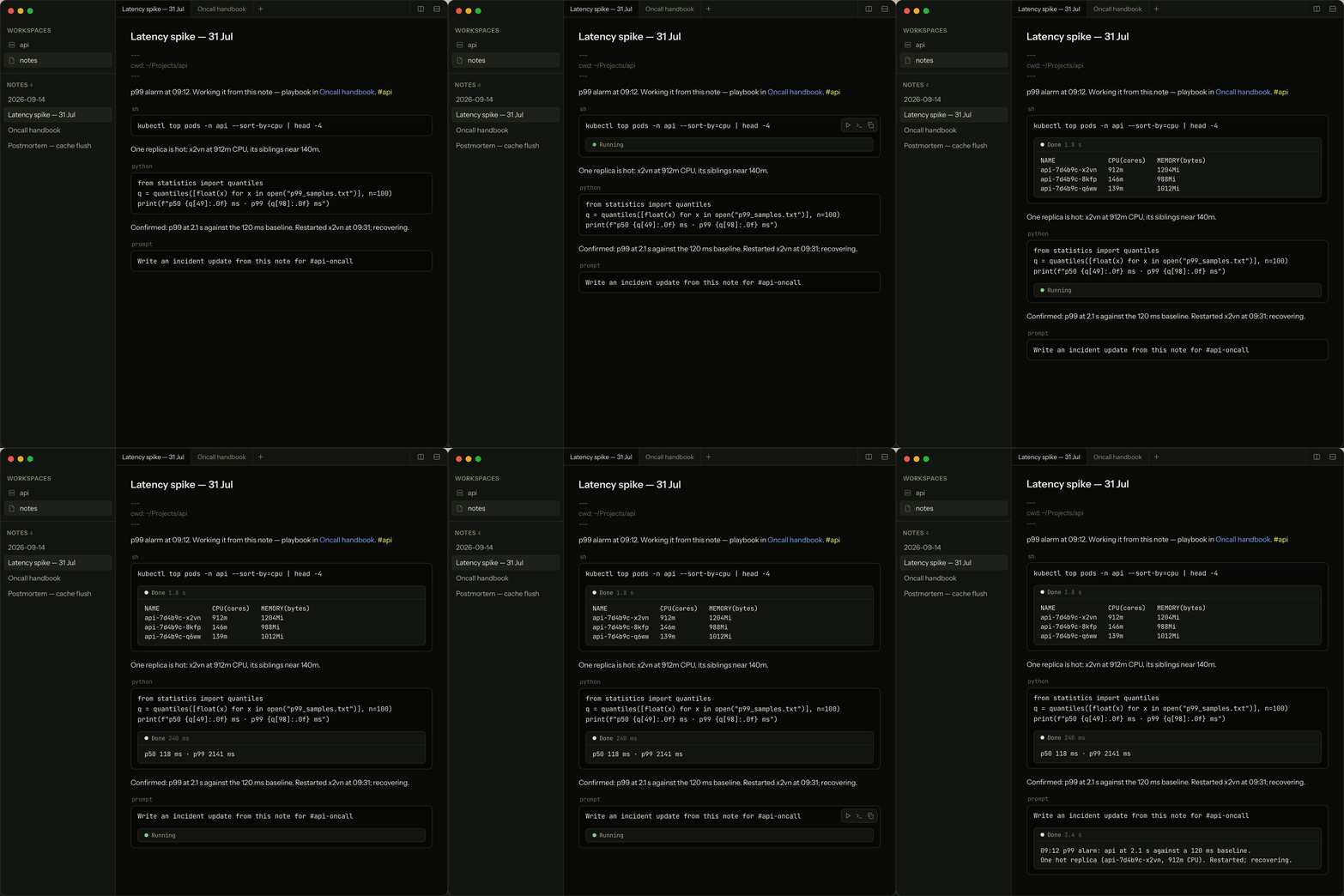
Picture published by the creator on GitHub.
Ledge: Run the shell commands and code saved in your Markdown notes
Added · Updated

Made by ledge.sh
View profile on GitHub (opens in a new tab)Ledge is a notes app that runs the code inside your notes: put your cursor in a fenced block (a code snippet in a Markdown file), press ⌘↩, and the output streams in underneath.
Shell, Python, Node, Ruby, PHP and TypeScript work out of the box, plus SQL and Redis against a database the note names. Notes are plain .md files in your own folders, on your computer or on a server reached over ssh (a secure remote login), and phone apps open the same notes. The creator built it to stop copying commands from notes into a terminal.
What it does
Each note gets its own shell, so a change of folder or an environment variable set in one block carries into the next, and front matter at the top of a note (cwd:, env:, host:) can point every run at a project folder or at another machine over ssh. A running block takes input, so a sudo password or a yes/no prompt can be answered in place. Secrets can live in a separate profile file that the note only names, and a note can be locked, which encrypts its text on disk behind a passphrase. Underneath it is an ordinary notes app: wiki-style links between notes, backlinks, tags, full-text search, daily notes and templates. Because notes are files in a folder, iCloud Drive, Dropbox, Syncthing or Git can sync them. It is built on Bun and Electrobun, with a command-line tool and an MCP server (a connector for AI assistants such as Claude Code) for agents that read and write notes. Apache-2.0 licensed.
You could use it to…
- Run a shell command from a note by pressing ⌘↩ inside its code block
- Step through a deploy checklist note, reading each result before the next
- Run a SQL query against a database the note names
Can I use this?
You'll need A Mac (Apple Silicon), Windows 11 with WSL, or Linux · Free download
Worth knowing It runs real commands on your machine or server, so a note can do anything you could do in a terminal; the app can ask before running blocks you mark as needing confirmation. The Mac build is Apple Silicon only, Windows needs WSL (Linux inside Windows), and the Android app is in open beta. The creator says it has no AI built in; prompt blocks send text to an agent you already use.
Why it's here
Not trending this week
Last on the BuildTube front page on 6 October 2026. It stays on BuildTube so you can still find it.
- 355 people have starred it on GitHub.
- Shown on Hacker News (Show HN) on 29 September, with 204 points.
Numbers checked on 8 November 2026; not refreshed since.
Behind it
View setup guideBuildTube has not run or verified this project. Everything above is written from what the creator published.
Made this?
Quick questions
- What is Ledge?
- Each note gets its own shell, so a change of folder or an environment variable set in one block carries into the next, and front matter at the top of a note (cwd:, env:, host:) can point every run at a project folder or at another machine over ssh.
- What can I use Ledge for?
- Run a shell command from a note by pressing ⌘↩ inside its code block; Step through a deploy checklist note, reading each result before the next; Run a SQL query against a database the note names
- Can I run Ledge on my computer?
- It installs as a desktop app on your own computer. The Mac build is Apple Silicon only, Windows needs WSL (Linux inside Windows), and the Android app is in open beta. A Mac (Apple Silicon), Windows 11 with WSL, or Linux.
- What do I need to use Ledge?
- Mac: download the DMG and drag it to Applications (macOS 13 or newer on Apple Silicon). Linux: run the installer (Ubuntu 22.04, Debian 12, Fedora 38 or newer, with GTK 3 and WebKitGTK 4.1). Windows 11: run the installer, with WSL installed first. Phones and a remote server: install ledge-server on a Linux machine or Mac with one curl command, then pair the app with a code.
- What license does Ledge use?
- The source lists the Apache License 2.0 license (Apache-2.0), an OSI-approved open-source license. Read the license file on the source page for the full terms.
More from this week
- agent-desktop Let AI agents read and click desktop apps
For developers building computer-use agents: agent-desktop lets an AI agent read and operate desktop apps on Mac, Windows or Linux from a command line.
- Auto-Ontology Give AI agents checked business meanings for your database
Help AI agents answer questions about company databases using reviewed definitions and SQL, with each answer showing its steps.
- Spec Kit Turn a written spec into plans, tasks and code
Spec Kit gives your AI coding agent a step-by-step process to build a feature, fix a bug or assess an idea.
Explore by topic
Post this
 Download share image
For makers
Made this? Show it’s on BuildTube — add the badge to your README or embed the card on your site.

README badge (Markdown)
[](https://buildtube.app/p/gh-ledgesh-ledge/)Embed card (HTML)
<iframe src="https://buildtube.app/embed/gh-ledgesh-ledge/" width="560" height="240" style="border:0;max-width:100%" loading="lazy" title="Ledge on BuildTube"></iframe>