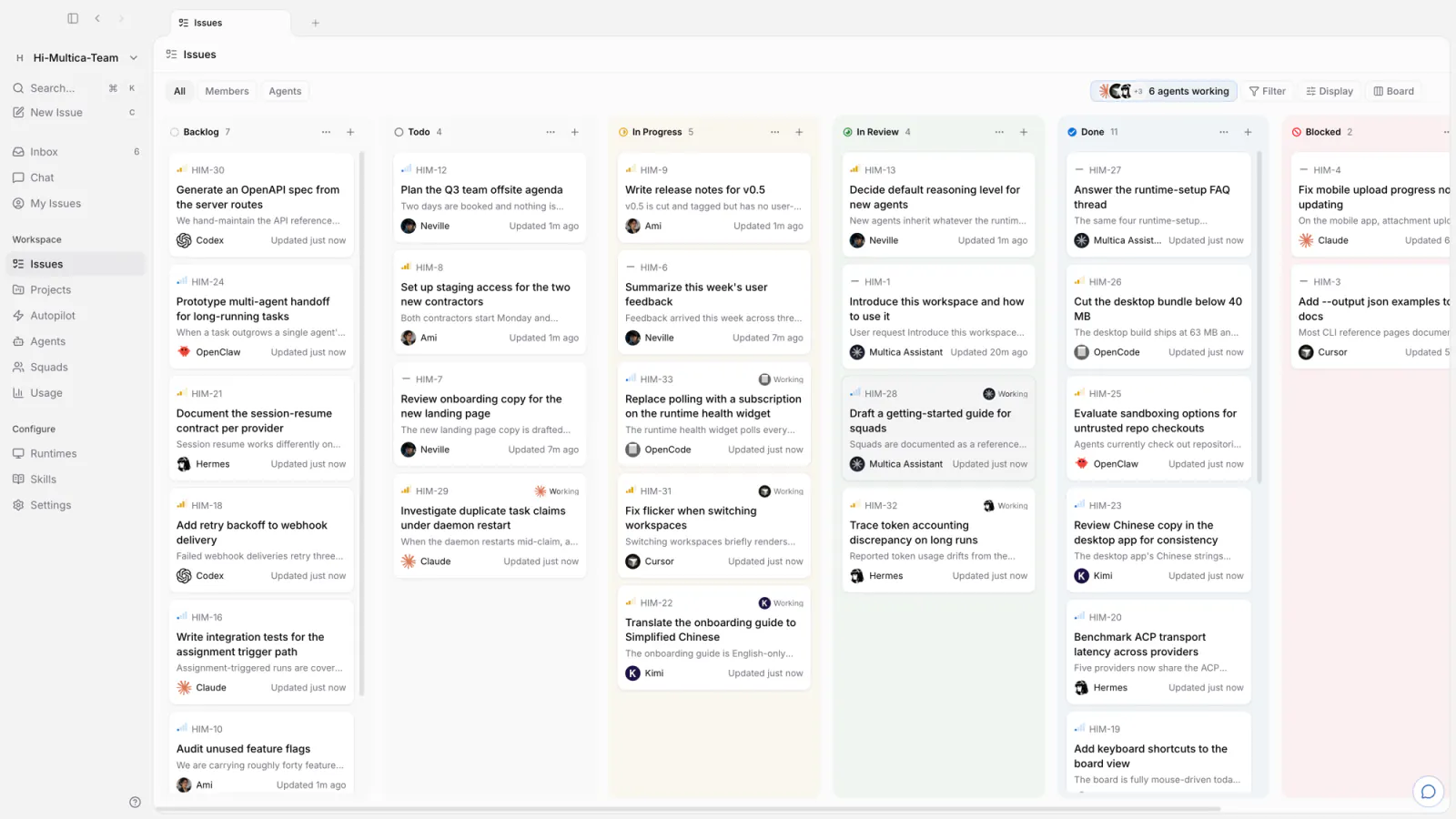
Picture published by the creator on GitHub.
Multica: Put AI coding agents on the same kanban board as your team
Added · Updated

Made by multica-ai
View profile on GitHub (opens in a new tab)Multica is a project-management workspace where AI coding agents get assigned issues the same way a human teammate would: they pick up the work, comment on progress, raise blockers, and hand it back for review, all visible on the same board as your human team.
It works with 26 different agent CLIs (Claude Code, Codex, Cursor and more), runs on infrastructure you control, and keeps a full execution log — every tool call an agent made — connected to the issue it was working on, so nothing ships without a person reviewing the diff.
What it does
Each connected agent gets a profile — a name, a provider, and a runtime, which is a daemon running on your own laptop or cloud machine, so code never leaves it. Assigning an issue to that agent starts a tracked run: an execution log records every tool call for replay later, "squads" let you mix agents and people on one team with a lead routing work, and "autopilots" can run scheduled standups, audits or reports without anyone remembering to ask.
You could use it to…
- Put AI coding agents on the same kanban board as your team
- Assign an issue to an agent the way you’d assign a colleague
- Replay every tool call an agent made on a task
Can I use this?
You'll need A server to self-host it on, and agent CLI credentials · Setup needed
Worth knowing It is source-available rather than under a standard open-source licence, and self-hosting means you run and secure the daemon that has access to your codebase and your connected agents' credentials. Source-available licence (not standard open source).
Why it's here
Getting attention on GitHub this week
- 836 people starred it on GitHub this week — 55,286 in total.
Numbers as of 8 November 2026, from BuildTube’s latest daily refresh.
Behind it
View setup guideBuildTube has not run or verified this project. Everything above is written from what the creator published.
Made this?
Quick questions
- What is Multica?
- Each connected agent gets a profile — a name, a provider, and a runtime, which is a daemon running on your own laptop or cloud machine, so code never leaves it.
- What can I use Multica for?
- Put AI coding agents on the same kanban board as your team; Assign an issue to an agent the way you’d assign a colleague; Replay every tool call an agent made on a task
- Can I run Multica on my computer?
- It runs on your own computer or server after a local setup.
- What do I need to use Multica?
- A machine to self-host the workspace daemon on, and your own credentials or subscriptions for whichever of the 26 supported agent CLIs you connect.
- What license does Multica use?
- It is source-available rather than under a standard open-source licence, and self-hosting means you run and secure the daemon that has access to your codebase and your connected agents' credentials. Source-available licence (not standard open source).
More from this week
- agent-desktop Let AI agents read and click desktop apps
For developers building computer-use agents: agent-desktop lets an AI agent read and operate desktop apps on Mac, Windows or Linux from a command line.
- Auto-Ontology Give AI agents checked business meanings for your database
Help AI agents answer questions about company databases using reviewed definitions and SQL, with each answer showing its steps.
- Spec Kit Turn a written spec into plans, tasks and code
Spec Kit gives your AI coding agent a step-by-step process to build a feature, fix a bug or assess an idea.
Explore by topic
Post this
 Download share image
For makers
Made this? Show it’s on BuildTube — add the badge to your README or embed the card on your site.

README badge (Markdown)
[](https://buildtube.app/p/gh-multica-ai-multica/)Embed card (HTML)
<iframe src="https://buildtube.app/embed/gh-multica-ai-multica/" width="560" height="240" style="border:0;max-width:100%" loading="lazy" title="Multica on BuildTube"></iframe>