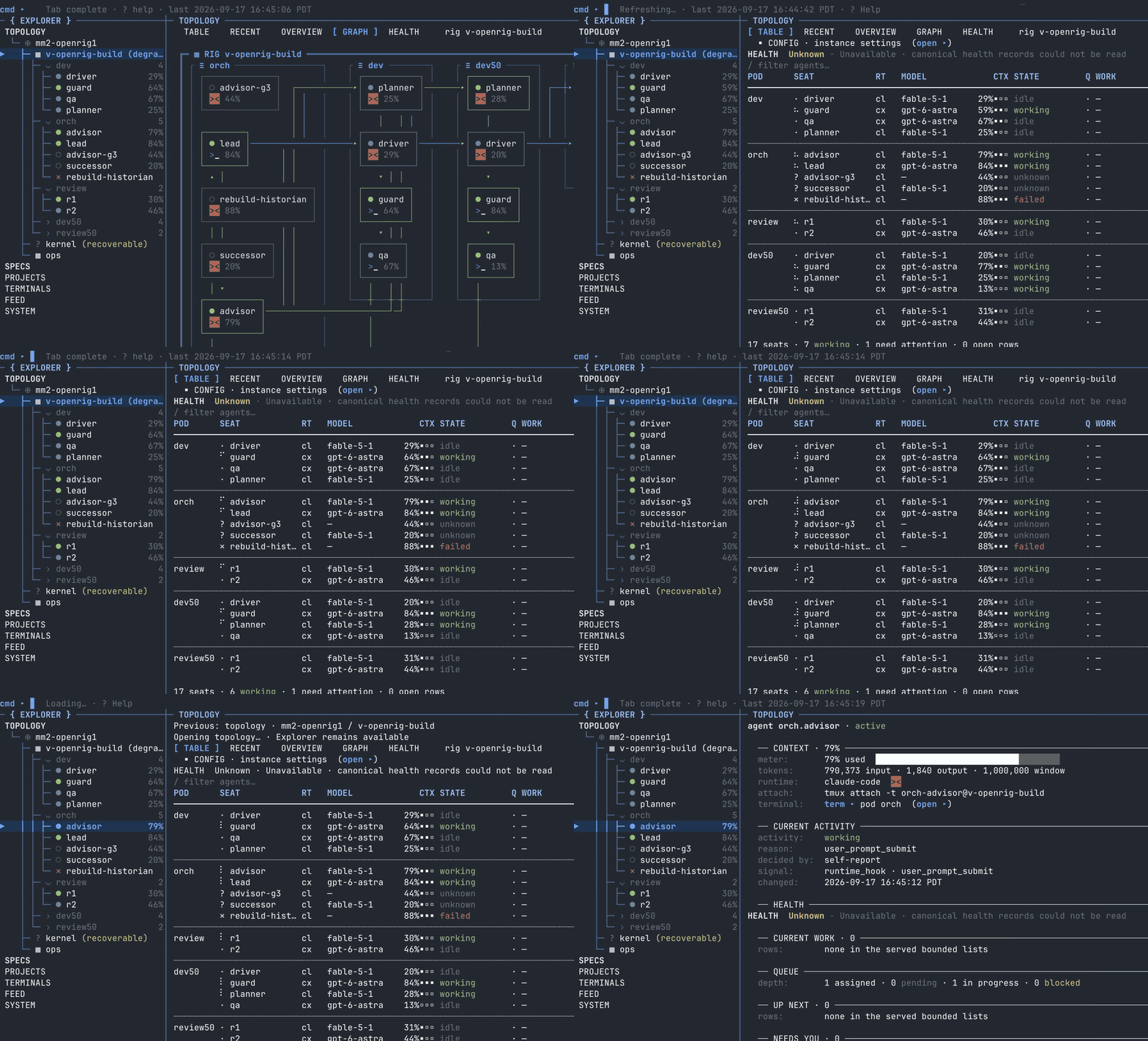
Picture published by the creator on GitHub.
OpenRig: Run Claude Code and Codex together as one agent team
Added · Updated

Made by Mike Schwarz
View profile on GitHub (opens in a new tab)OpenRig turns a pile of AI coding-assistant windows into an organized team: you describe the team in a YAML settings file, start it with one command, and it runs Claude Code, Codex and Pi with roles, shared context and owned tasks.
You talk to a lead agent about the outcome you want while specialists work in parallel, and the team’s work persists at the same addresses between sessions instead of evaporating when you close a window. It needs Node.js and tmux on Mac or Linux; Windows is not supported. The creator presents it as the open-source system behind the creator’s own AI civilization experiments — long-running simulations of agent societies.
What it does
The pitch is that a harness wraps one model, while a rig wraps your harnesses: OpenRig is the layer that coordinates several coding agents as a persistent team. Each agent occupies a "seat" with a role, its own runtime and model, and shared context; a lead agent takes your goal in plain language and delegates to specialists, bringing back results and the decisions that need your attention. A terminal interface shows the team as a graph and as a table of seats with runtime, model, context and state. Setup asks once whether agents may run OpenRig commands without repeated permission prompts — the project stresses this is scoped to your project, not a global "yes to everything".
You could use it to…
- Start a team of coding agents from one YAML file and one command
- Tell a lead agent the outcome you want while specialists work in parallel
- Come back to the same agent team after closing your windows
Can I use this?
You'll need Mac or Linux with Node.js 22/24 and tmux, plus Claude Code and/or Codex accounts · Setup needed
Worth knowing No native Windows support and WSL2 is untested. It organizes agents you already pay for — it is not itself an AI model, so you still need those subscriptions. Licensed under Apache License 2.0.
Why it's here
Not trending this week
Last seen on the GitHub trending list on 13 October 2026. It stays on BuildTube so you can still find it.
- 8,745 people have starred it on GitHub.
Numbers checked on 8 November 2026; not refreshed since.
Behind it
View setup guideBuildTube has not run or verified this project. Everything above is written from what the creator published.
Made this?
Quick questions
- What is OpenRig?
- The pitch is that a harness wraps one model, while a rig wraps your harnesses: OpenRig is the layer that coordinates several coding agents as a persistent team.
- What can I use OpenRig for?
- Start a team of coding agents from one YAML file and one command; Tell a lead agent the outcome you want while specialists work in parallel; Come back to the same agent team after closing your windows
- Can I run OpenRig on my computer?
- It runs from a terminal on your own computer. No native Windows support and WSL2 is untested. Mac or Linux with Node.js 22/24 and tmux, plus Claude Code and/or Codex accounts.
- What do I need to use OpenRig?
- You install the command-line tool globally, run a dry-run setup that previews what it changes on your machine (provider hooks and workspace trust settings), then choose which existing accounts — Claude Code, Codex, or both — the team will use.
- What license does OpenRig use?
- Licensed under Apache License 2.0.
More from this week
- Stroq Check AI coding agent sessions for leaked keys
Stroq scans your recent Claude Code and Codex sessions for keys that left your machine.
- agent-desktop Let AI agents read and click desktop apps
For developers building computer-use agents: agent-desktop lets an AI agent read and operate desktop apps on Mac, Windows or Linux from a command line.
- DeepTutor Study your own documents with a personal AI tutor
Read documents with page-by-page citations, practice daily and get video lessons from an AI tutor.
Explore by topic
Post this
 Download share image
For makers
Made this? Show it’s on BuildTube — add the badge to your README or embed the card on your site.

README badge (Markdown)
[](https://buildtube.app/p/gh-mvschwarz-openrig/)Embed card (HTML)
<iframe src="https://buildtube.app/embed/gh-mvschwarz-openrig/" width="560" height="240" style="border:0;max-width:100%" loading="lazy" title="OpenRig on BuildTube"></iframe>