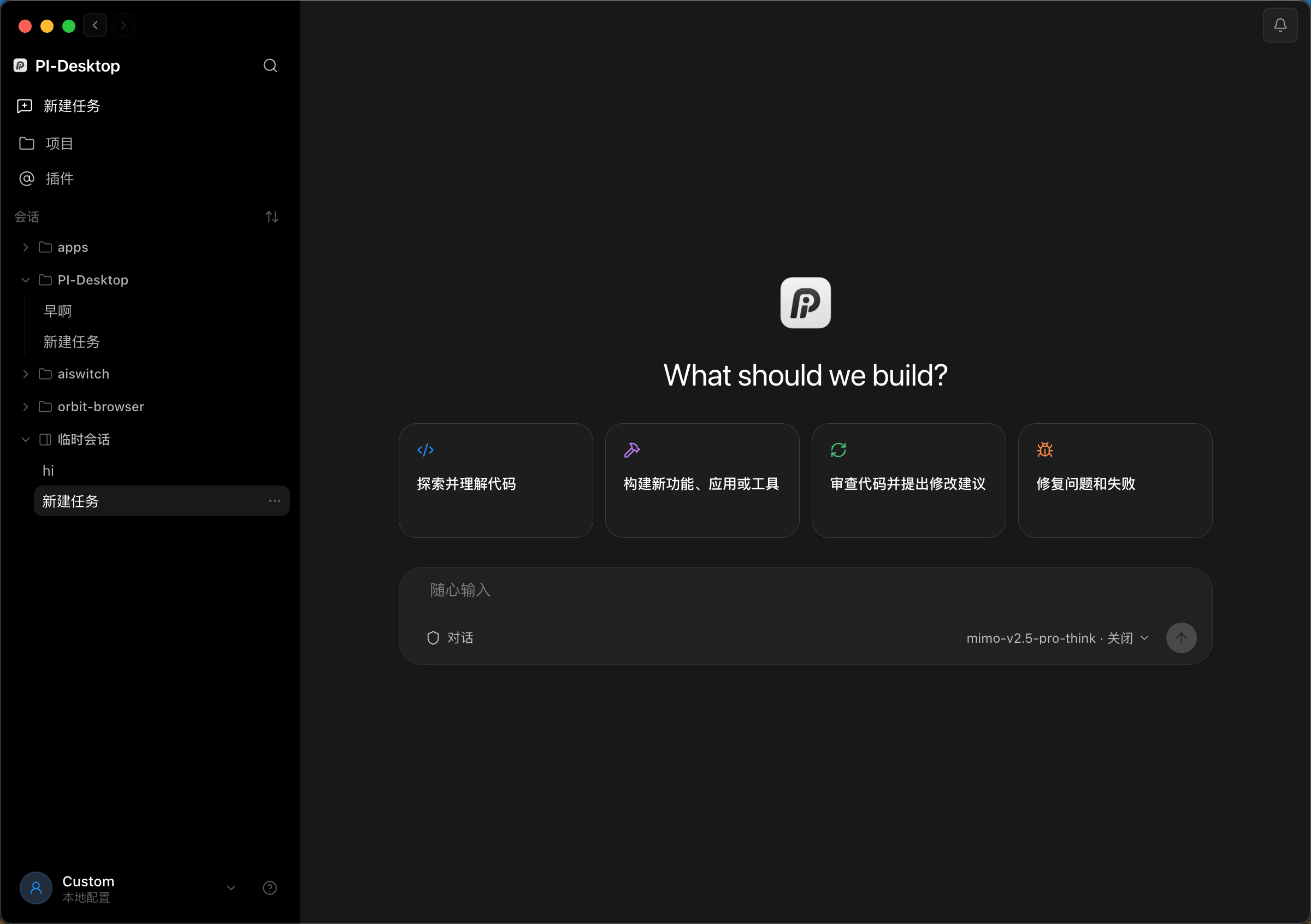
Picture published by the creator on GitHub.
PI-Desktop: Give your coding agent a desktop of its own, with your model
Added · Updated

Made by Lan
View profile on GitHub (opens in a new tab)A desktop workspace built specifically for AI coding agents, rather than an agent bolted into an editor or a terminal.
Projects, sessions, files, reviews, previews, models, permissions and long-running work live together in one window. You bring your own model — OpenAI, Anthropic, a local model, or any endpoint that speaks the OpenAI API — and switch between them inside a session without starting over. Privileged actions pass through a permission layer where you inspect the change and the command output before approving. The project says projects and sessions stay on your machine with no account and no mandatory relay.
What it does
Most coding agents live somewhere that belongs to something else: a terminal window, an extension inside an editor, or a hosted service. PI-Desktop argues the workflow deserves its own room. It is an Electron shell over a Rust core running the agent harness, and it holds a project’s sessions, files, code reviews, previews and background work in one place without tying you to a particular editor, model vendor or hosted runtime. Model handling is a first-class feature rather than a settings page: several providers configured at once, per-model context windows, output limits and reasoning levels, and switching mid-session. Control is the other half — agents can read, edit and run, but privileged actions route through a permission layer where you read the diff and the command output first. It extends through skills, MCP servers, subagents and installable plugins, and can import existing sessions from Claude Code, Codex, OpenCode and Pi.
You could use it to…
- Switch from one AI model to another mid-session without starting over
- Inspect a change and its command output before approving it
- Keep projects, sessions and reviews together in one window
Can I use this?
You'll need macOS, Windows or Linux, plus your own model access · Setup needed
Worth knowing The project labels itself an early preview: usable for real work, but with interfaces and some behaviours still changing, which means updates may move things underneath you. It runs agents that read files, edit code and run commands, so the permission layer is the thing standing between an agent and your machine — treat approving a command as approving a command. You supply and pay for the model. LGPL-3.0.
Why it's here
Not trending this week
Last seen on the GitHub trending list on 20 September 2026. It stays on BuildTube so you can still find it.
- 7,780 people have starred it on GitHub.
Numbers checked on 8 November 2026; not refreshed since.
Behind it
View setup guideBuildTube has not run or verified this project. Everything above is written from what the creator published.
Made this?
Quick questions
- What is PI-Desktop?
- Most coding agents live somewhere that belongs to something else: a terminal window, an extension inside an editor, or a hosted service.
- What can I use PI-Desktop for?
- Switch from one AI model to another mid-session without starting over; Inspect a change and its command output before approving it; Keep projects, sessions and reviews together in one window
- Can I run PI-Desktop on my computer?
- It installs as a desktop app on your own computer. macOS, Windows or Linux, plus your own model access.
- What do I need to use PI-Desktop?
- A macOS, Windows or Linux machine and the download from the project, plus an API key or a local model endpoint. There is no account to create; the project says model requests go directly to the provider you configure.
- What license does PI-Desktop use?
- The source lists the GNU Lesser General Public License v3.0 license (LGPL-3.0), an OSI-approved open-source license. Read the license file on the source page for the full terms.
More from this week
- agent-desktop Let AI agents read and click desktop apps
For developers building computer-use agents: agent-desktop lets an AI agent read and operate desktop apps on Mac, Windows or Linux from a command line.
- Stroq Check AI coding agent sessions for leaked keys
Stroq scans your recent Claude Code and Codex sessions for keys that left your machine.
- OpenBot Run AI coworkers with their own browser and files
Give an AI coworker a job, connect the tools it needs and watch it work.
Explore by topic
Post this
 Download share image
For makers
Made this? Show it’s on BuildTube — add the badge to your README or embed the card on your site.

README badge (Markdown)
[](https://buildtube.app/p/gh-vastsa-pi-desktop/)Embed card (HTML)
<iframe src="https://buildtube.app/embed/gh-vastsa-pi-desktop/" width="560" height="240" style="border:0;max-width:100%" loading="lazy" title="PI-Desktop on BuildTube"></iframe>