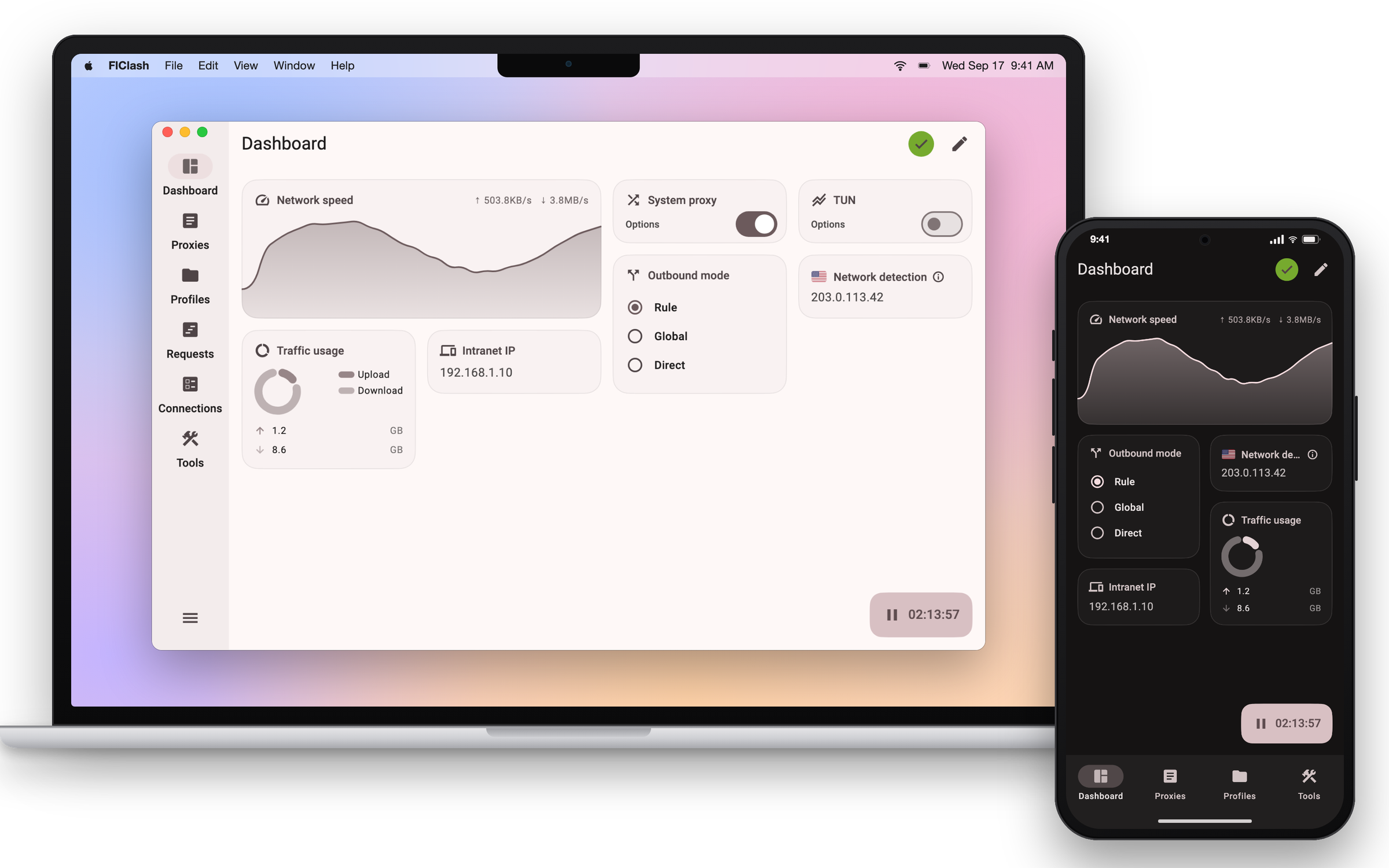
Picture published by the creator on GitHub.
FlClash: Manage network proxy connections from one cross-platform app
Added · Updated

Made by chen08209
View profile on GitHub (opens in a new tab)Route your phone or computer’s traffic through proxy servers from your own provider, and manage those connections from one app on Android, Windows, macOS and Linux.
FlClash is for people who already have a proxy subscription and want the same client on every device. It runs on the mihomo (Clash.Meta) core, a proxy engine that sends traffic through different servers according to rules, and adds latency tests, TUN mode (capturing all of a device’s traffic) and live views of connections and DNS queries. The source describes it as open source and ad-free.
What it does
The app is a Flutter-based interface over the ClashMeta proxy engine, presenting the same core features — protocol support, subscription management, and rule-based routing — consistently across mobile and desktop, with platform-appropriate installers for each (an Android package, and build scripts for Windows, macOS and Linux). WebDAV sync means server lists and settings configured on one device can be pulled onto another rather than re-entered by hand.
How to use it
Download the build for your device from GitHub Releases or the project website: an APK on Android, an installer or zip on Windows, a DMG or Homebrew cask on macOS, and deb, rpm or AppImage on Linux. Import a profile from your provider’s subscription link or a file, or open a clash://install-config link to import it in one step, then switch the proxy on and watch connections in the live views.
Common use cases
- Paste a subscription link from your proxy provider and get its servers loaded as a profile, which you can then adjust with custom rules, proxies and proxy groups.
- On Android, have Tasker or MacroDroid start, stop or toggle the proxy using FlClash’s activity actions, or send the toggle from a computer over adb.
- Back up your profiles and settings to WebDAV or a local file on one device and restore them on another instead of setting it up again.
You could use it to…
- Manage proxy connections from one app on every device
- Sync your server list across phone, Mac and PC
- Switch color themes to match your system automatically
Can I use this?
Requirements An Android device, Windows 10 or later, macOS 12 or later, or Linux, with x64 or ARM64 builds on desktops. You need your own proxy subscription link or server details, since profiles are imported rather than supplied. On Linux with the AppImage or rpm, install the AyatanaAppIndicator library for the tray icon. The source does not list hardware requirements.
Caveat It is a client only and ships no proxy servers, so what it connects to depends entirely on the profile you import. Building from source needs Flutter 3.47, Go 1.27 and Rust, and each desktop platform builds on its own host.
Worth knowing This app manages network proxy connections, which can be used for legitimate privacy and access purposes but also to route around network restrictions; how you use it and whether it is legal or permitted in your context is your own responsibility. Licensed under GNU General Public License v3.0, an open-source licence that requires anyone who distributes a modified version to share its source under the same licence.
Why it's here
Not trending this week
Last seen on the GitHub trending list on 18 October 2026. It stays on BuildTube so you can still find it.
- 62,064 people have starred it on GitHub.
Numbers checked on 8 November 2026; not refreshed since.
Behind it
View setup guideBuildTube has not run or verified this project. Everything above is written from what the creator published.
Made this?
Quick questions
- What is FlClash?
- The app is a Flutter-based interface over the ClashMeta proxy engine, presenting the same core features — protocol support, subscription management, and rule-based routing — consistently across mobile and desktop, with platform-appropriate installers for each (an Android package, and build scripts for Windows, macOS and Linux).
- What can I use FlClash for?
- Paste a subscription link from your proxy provider and get its servers loaded as a profile, which you can then adjust with custom rules, proxies and proxy groups; On Android, have Tasker or MacroDroid start, stop or toggle the proxy using FlClash’s activity actions, or send the toggle from a computer over adb; Back up your profiles and settings to WebDAV or a local file on one device and restore them on another instead of setting it up again
- Can I run FlClash on my computer?
- It installs as a desktop app on your own computer. An Android device, Windows 10 or later, macOS 12 or later, or Linux, with x64 or ARM64 builds on desktops. On Linux with the AppImage or rpm, install the AyatanaAppIndicator library for the tray icon.
- What do I need to use FlClash?
- An Android, Windows, macOS or Linux device, and your own proxy subscription link or server details from a provider.
- What license does FlClash use?
- Licensed under GNU General Public License v3.0, an open-source licence that requires anyone who distributes a modified version to share its source under the same licence.
More from this week
- agent-desktop Let AI agents read and click desktop apps
For developers building computer-use agents: agent-desktop lets an AI agent read and operate desktop apps on Mac, Windows or Linux from a command line.
- Auto-Ontology Give AI agents checked business meanings for your database
Help AI agents answer questions about company databases using reviewed definitions and SQL, with each answer showing its steps.
- Spec Kit Turn a written spec into plans, tasks and code
Spec Kit gives your AI coding agent a step-by-step process to build a feature, fix a bug or assess an idea.
Explore by topic
Post this
 Download share image
For makers
Made this? Show it’s on BuildTube — add the badge to your README or embed the card on your site.

README badge (Markdown)
[](https://buildtube.app/p/gh-chen08209-flclash/)Embed card (HTML)
<iframe src="https://buildtube.app/embed/gh-chen08209-flclash/" width="560" height="240" style="border:0;max-width:100%" loading="lazy" title="FlClash on BuildTube"></iframe>