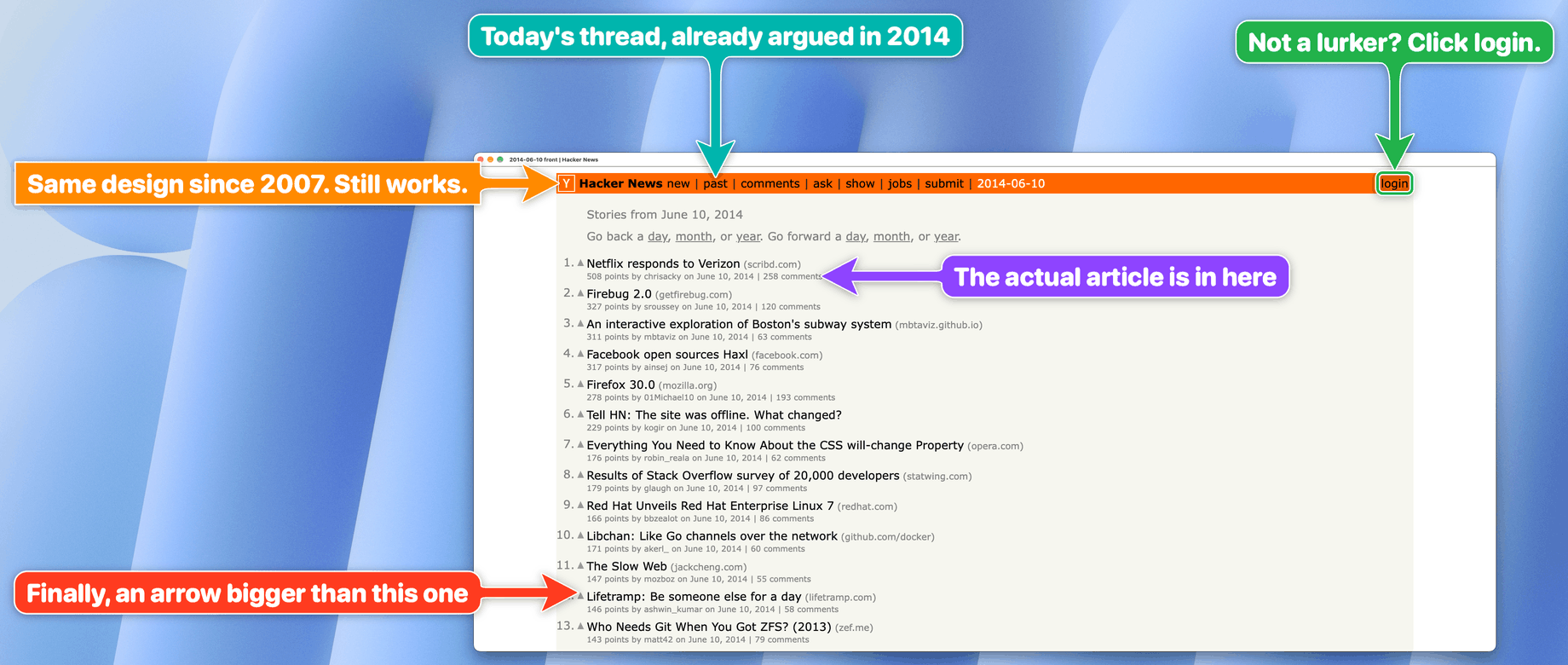
Picture published by the creator on GitHub.
big-arrow-on-the-screen: Point users to Mac controls with bigarrow
Added · Updated

Made by Franz Enzenhofer
View profile on GitHub (opens in a new tab)Let a coding agent draw a big arrow with a sign over any Mac window to show you which button to click.
bigarrow is a macOS command-line tool, plus a skill (an add-on that teaches an AI assistant a new tool) for Claude Code and Codex, for people whose agents need a human to approve, type or choose something. The arrow sits in a transparent layer above every window: clicks pass through, keyboard focus stays put, and the arrow removes itself. It never clicks, types or captures the screen. The creator says drawing needs no macOS permission and that 104 automated tests check its behaviour.
What it does
An overlay draws arrows and signs while allowing clicks through and preserving keyboard focus. Arrows remove themselves.
How to use it
Install with brew install franzenzenhofer/tap/bigarrow, then run bigarrow install-skill so Claude Code and Codex learn to use it. An agent, or you, runs a command such as bigarrow point with the label of a button, the app name and a message; an arrow and sign appear on that control and vanish after 8 seconds by default. bigarrow start and bigarrow stop keep an arrow up until the step is done.
Common use cases
- Guide a permission step: point at the Terminal switch in System Settings with a sign saying to turn it on, so the person sees exactly where to click.
- Hand over a code to paste: wrap a value in double curly braces in the sign text and it becomes a copy button beside the field where it belongs.
- Make a step-by-step guide: point at each control in turn in an app such as Keynote, or render the arrow straight to a picture with --png for documentation.
Can I use this?
Requirements macOS 14 or later, with Homebrew to install; building from source needs Xcode 16 or later. Drawing at a coordinate or window needs no permission, but finding a button by its label needs Accessibility access for the app that runs bigarrow, and some window-title lookups need Screen Recording. The source does not list hardware requirements.
Caveat Finding elements inside Chrome web pages only works with Chrome started with an accessibility flag or VoiceOver on; otherwise the agent points at coordinates. It only points, so the person still has to act.
Worth knowing It points at controls but never clicks, types, or captures the screen. Licensed under MIT.
Why it's here
Not trending this week
Last on the BuildTube front page on 15 October 2026. It stays on BuildTube so you can still find it.
- 838 people have starred it on GitHub.
- Shown on Hacker News (Show HN) on 9 October, with 419 points.
Numbers checked on 8 November 2026; not refreshed since.
Behind it
View sourceBuildTube has not run or verified this project. Everything above is written from what the creator published.
Made this?
Quick questions
- What is big-arrow-on-the-screen?
- An overlay draws arrows and signs while allowing clicks through and preserving keyboard focus.
- What can I use big-arrow-on-the-screen for?
- Guide a permission step: point at the Terminal switch in System Settings with a sign saying to turn it on, so the person sees exactly where to click; Hand over a code to paste: wrap a value in double curly braces in the sign text and it becomes a copy button beside the field where it belongs; Make a step-by-step guide: point at each control in turn in an app such as Keynote, or render the arrow straight to a picture with --png for documentation
- Can I run big-arrow-on-the-screen on my computer?
- macOS 14 or later, with Homebrew to install; building from source needs Xcode 16 or later. The source does not list hardware requirements.
- What do I need to use big-arrow-on-the-screen?
- macOS 14+ and Xcode 16+ to build from source.
- What license does big-arrow-on-the-screen use?
- Licensed under MIT.
More from this week
- agent-desktop Let AI agents read and click desktop apps
For developers building computer-use agents: agent-desktop lets an AI agent read and operate desktop apps on Mac, Windows or Linux from a command line.
- Stroq Check AI coding agent sessions for leaked keys
Stroq scans your recent Claude Code and Codex sessions for keys that left your machine.
- DeepTutor Study your own documents with a personal AI tutor
Read documents with page-by-page citations, practice daily and get video lessons from an AI tutor.
Explore by topic
Post this
 Download share image
For makers
Made this? Show it’s on BuildTube — add the badge to your README or embed the card on your site.

README badge (Markdown)
[](https://buildtube.app/p/gh-franzenzenhofer-big-arrow-on-the-screen/)Embed card (HTML)
<iframe src="https://buildtube.app/embed/gh-franzenzenhofer-big-arrow-on-the-screen/" width="560" height="240" style="border:0;max-width:100%" loading="lazy" title="big-arrow-on-the-screen on BuildTube"></iframe>