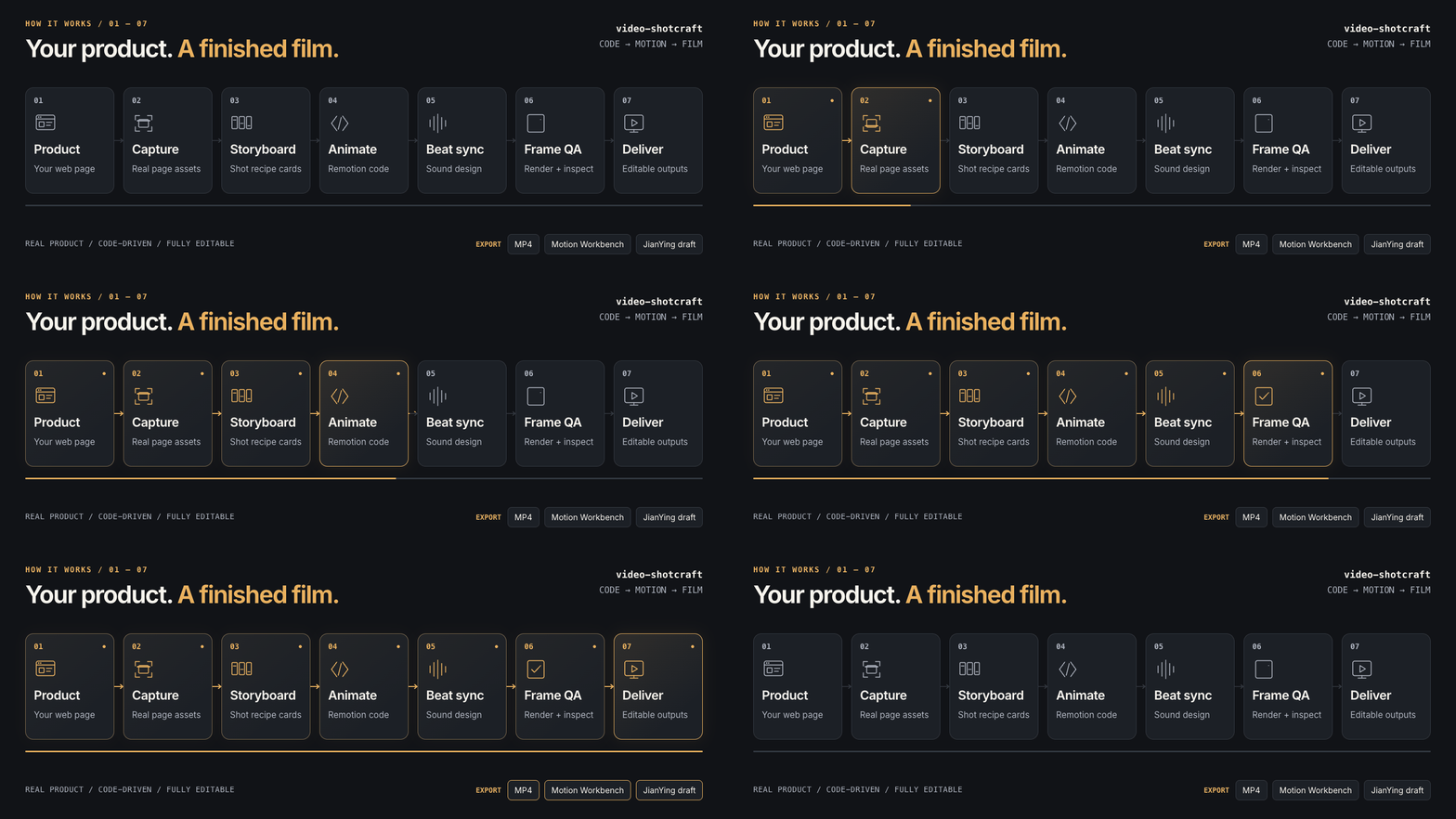
Picture published by the creator on GitHub.
video-shotcraft: Build product promo videos with video-shotcraft
Added · Updated

Made by Yihao
View profile on GitHub (opens in a new tab)Ask your coding agent to make a promo video for your product and get back a finished MP4 you can keep editing.
It is for product teams and makers who use Claude Code or Codex. It installs as a skill (an add-on that teaches the agent a workflow): the agent captures your real pages, picks shots from a library of motion recipes, writes a storyboard and animates it with Remotion (a tool that builds video from React code), then adds music, sound effects and frame checks. Every frame is drawn by code from your own screenshots and copy, not generated. The library holds 124 recipe cards and 150 shots.
What it does
The agent captures pages, chooses motion recipes, builds a storyboard and uses Remotion to animate an MP4 with sound and frame checks.
How to use it
Give Claude Code or Codex the repository link and ask it to install the skill, or run npx skills add Vincentwei1021/video-shotcraft. Then describe the film in plain words, for example: use video-shotcraft to make a promo for my product. The agent captures pages, storyboards, renders and hands you a 1920x1080 MP4 plus the Remotion project. A browser editor called Motion Workbench then opens so you can change text, timing and shots.
Common use cases
- Hand the agent your product’s pages, copy and logo and ask for a launch film with the Ink Press template; get a finished MP4 with music and sound effects.
- Copy shot names from the online Gallery, such as spotlight-hero-card, and ask for a short feature clip built from those shots using your screenshots.
- Open the delivered film in Motion Workbench, edit a caption, swap a shot and re-export, or export it as an editable JianYing (CapCut CN) draft.
Can I use this?
Requirements Claude Code or Codex. Node.js and npm for rendering, the template and the workbench; ffmpeg and ffprobe for frame checks. uv is needed only for beat analysis of background music, and puppeteer only for page capture. Remotion downloads its own headless Chrome on first render. The source says it is tested on macOS, with notes for Linux.
Caveat It does not generate video from prompts; you need real screenshots and copy, and the bundled demo screenshots must be replaced before publishing. Remotion has its own license, and the source notes that companies may need a paid Remotion license.
Worth knowing Frames are drawn by code from your screenshots and copy. JianYing export is documented as verified on JianYing Pro 11.2 for macOS; the Windows installer is marked untested. Bundled audio files each carry their own licences. Licensed under Apache License 2.0.
Why it's here
- 2,260 people starred it on GitHub this week — 17,796 in total.
Numbers as of 8 November 2026, from BuildTube’s latest daily refresh.
Behind it
View sourceBuildTube has not run or verified this project. Everything above is written from what the creator published.
Made this?
Quick questions
- What is video-shotcraft?
- The agent captures pages, chooses motion recipes, builds a storyboard and uses Remotion to animate an MP4 with sound and frame checks.
- What can I use video-shotcraft for?
- Hand the agent your product’s pages, copy and logo and ask for a launch film with the Ink Press template; get a finished MP4 with music and sound effects; Copy shot names from the online Gallery, such as spotlight-hero-card, and ask for a short feature clip built from those shots using your screenshots; Open the delivered film in Motion Workbench, edit a caption, swap a shot and re-export, or export it as an editable JianYing (CapCut CN) draft
- Can I run video-shotcraft on my computer?
- The source says it is tested on macOS, with notes for Linux. The documented JianYing export verification covers Pro 11.2 for macOS.
- What do I need to use video-shotcraft?
- Claude Code or Codex, plus your product pages, screenshots, copy and logo.
- What license does video-shotcraft use?
- Licensed under Apache License 2.0.
More from this week
- Stroq Check AI coding agent sessions for leaked keys
Stroq scans your recent Claude Code and Codex sessions for keys that left your machine.
- agent-desktop Let AI agents read and click desktop apps
For developers building computer-use agents: agent-desktop lets an AI agent read and operate desktop apps on Mac, Windows or Linux from a command line.
- DeepTutor Study your own documents with a personal AI tutor
Read documents with page-by-page citations, practice daily and get video lessons from an AI tutor.
Explore by topic
Post this
 Download share image
For makers
Made this? Show it’s on BuildTube — add the badge to your README or embed the card on your site.

README badge (Markdown)
[](https://buildtube.app/p/gh-vincentwei1021-video-shotcraft/)Embed card (HTML)
<iframe src="https://buildtube.app/embed/gh-vincentwei1021-video-shotcraft/" width="560" height="240" style="border:0;max-width:100%" loading="lazy" title="video-shotcraft on BuildTube"></iframe>