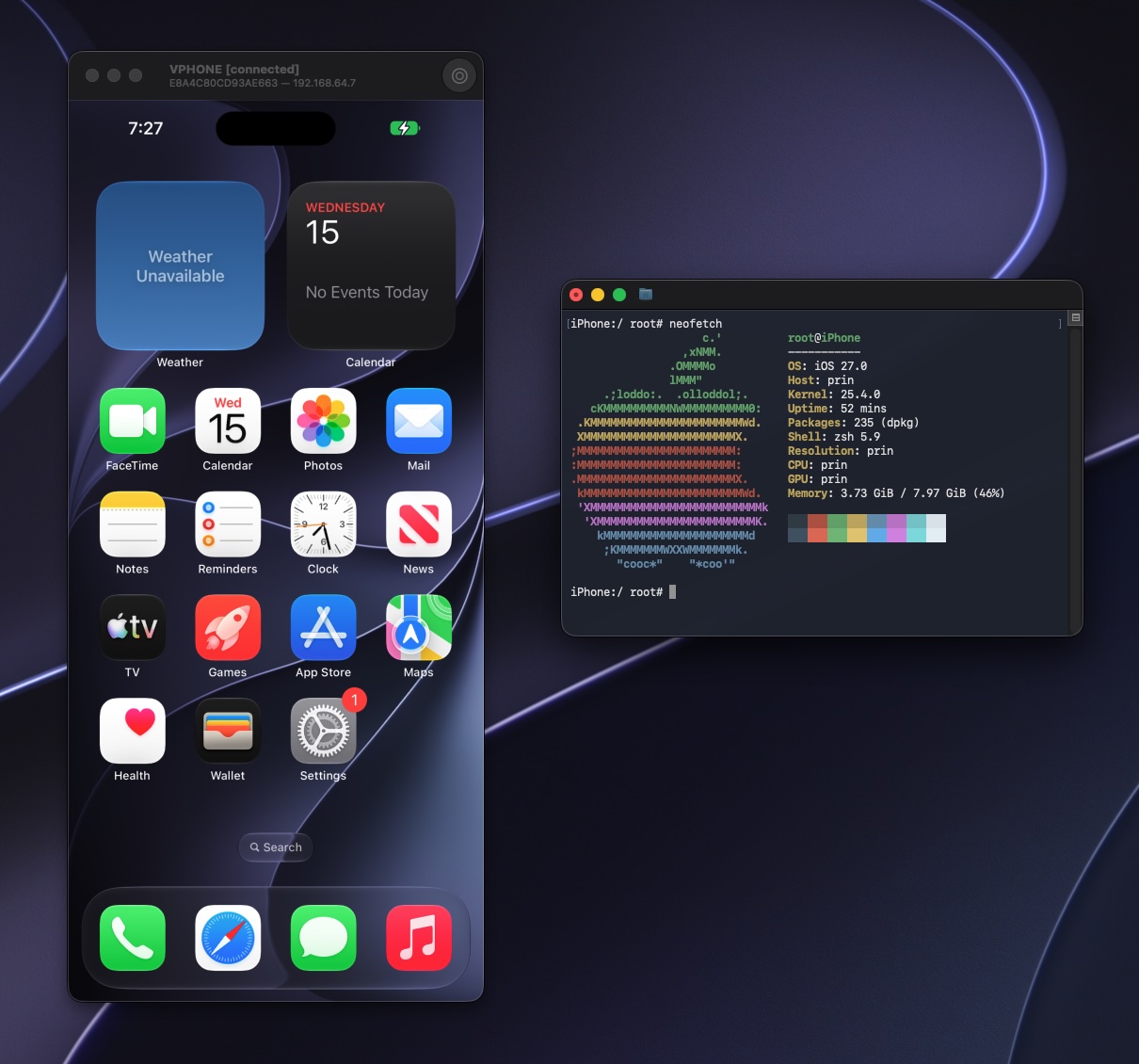
Picture published by the creator on GitHub.
vphone-cli: Boot a virtual iPhone on an Apple Silicon Mac for research
Added · Updated

Made by Lakr
View profile on GitHub (opens in a new tab)A command-line tool that boots a virtual iPhone on an Apple Silicon Mac using Apple’s own Virtualization framework together with the infrastructure Apple built for Private Cloud Compute research.
One command runs the whole pipeline — download the firmware, patch it, restore it, install it and boot — and you then reach the running phone over SSH or a screen-sharing connection. Five firmware patch variants are offered with increasing amounts of security bypass, and the project documents what each one changes.
What it does
Apple ships a virtualization framework in macOS, and separately built virtual-machine infrastructure so outside researchers could inspect its Private Cloud Compute system. This project combines the two to boot a guest iPhone image on your own Mac. The single create command chains the whole pipeline — fetching the firmware, applying patches, performing a restore, installing the modified firmware and booting it — and every stage is also exposed on its own so you can re-run just one. Once it is up you connect over SSH on a forwarded port or over a remote screen connection, and everything it downloads or builds lives in one directory outside the repository that you can relocate with an environment variable. The five patch variants trade increasing security bypass for increasing freedom inside the guest, with a per-component breakdown in the project’s research notes.
You could use it to…
- Boot a virtual iPhone on an Apple Silicon Mac with one command
- Reach the running phone over SSH or screen sharing
- Re-run one stage, such as the restore, on its own
Can I use this?
You'll need An Apple Silicon Mac with security protections relaxed · Setup needed
Worth knowing This one has a real cost of entry: it requires relaxing or disabling macOS’s System Integrity Protection and its code-signing enforcement, which are the protections that stop unsigned software from doing whatever it likes on your Mac. That is a meaningful reduction in your machine’s security, not a checkbox, and it is why this is research tooling rather than something to try casually. It needs Apple Silicon on macOS 15 or later plus Xcode and the iOS SDK, and it cannot run on a Mac that is itself a virtual machine. MIT licence.
Why it's here
Not trending this week
Last seen on the GitHub trending list on 20 September 2026. It stays on BuildTube so you can still find it.
- 16,568 people have starred it on GitHub.
Numbers checked on 8 November 2026; not refreshed since.
Behind it
View setup guideBuildTube has not run or verified this project. Everything above is written from what the creator published.
Made this?
Quick questions
- What is vphone-cli?
- Apple ships a virtualization framework in macOS, and separately built virtual-machine infrastructure so outside researchers could inspect its Private Cloud Compute system.
- What can I use vphone-cli for?
- Boot a virtual iPhone on an Apple Silicon Mac with one command; Reach the running phone over SSH or screen sharing; Re-run one stage, such as the restore, on its own
- Can I run vphone-cli on my computer?
- It runs from a terminal on your own computer. This one has a real cost of entry: it requires relaxing or disabling macOS’s System Integrity Protection and its code-signing enforcement, which are the protections that stop unsigned software from doing whatever it likes on your Mac. It needs Apple Silicon on macOS 15 or later plus Xcode and the iOS SDK, and it cannot run on a Mac that is itself a virtual machine.
- What do I need to use vphone-cli?
- An Apple Silicon Mac running macOS 15 or later that is not itself virtualized, Xcode with the iOS SDK to cross-compile the guest daemon, and the system security relaxation the project documents in two variants. Firmware images are downloaded or supplied by you.
- What license does vphone-cli use?
- MIT licence.
More from this week
- agent-desktop Let AI agents read and click desktop apps
For developers building computer-use agents: agent-desktop lets an AI agent read and operate desktop apps on Mac, Windows or Linux from a command line.
- Auto-Ontology Give AI agents checked business meanings for your database
Help AI agents answer questions about company databases using reviewed definitions and SQL, with each answer showing its steps.
- Spec Kit Turn a written spec into plans, tasks and code
Spec Kit gives your AI coding agent a step-by-step process to build a feature, fix a bug or assess an idea.
Explore by topic
Post this
 Download share image
For makers
Made this? Show it’s on BuildTube — add the badge to your README or embed the card on your site.

README badge (Markdown)
[](https://buildtube.app/p/gh-lakr233-vphone-cli/)Embed card (HTML)
<iframe src="https://buildtube.app/embed/gh-lakr233-vphone-cli/" width="560" height="240" style="border:0;max-width:100%" loading="lazy" title="vphone-cli on BuildTube"></iframe>