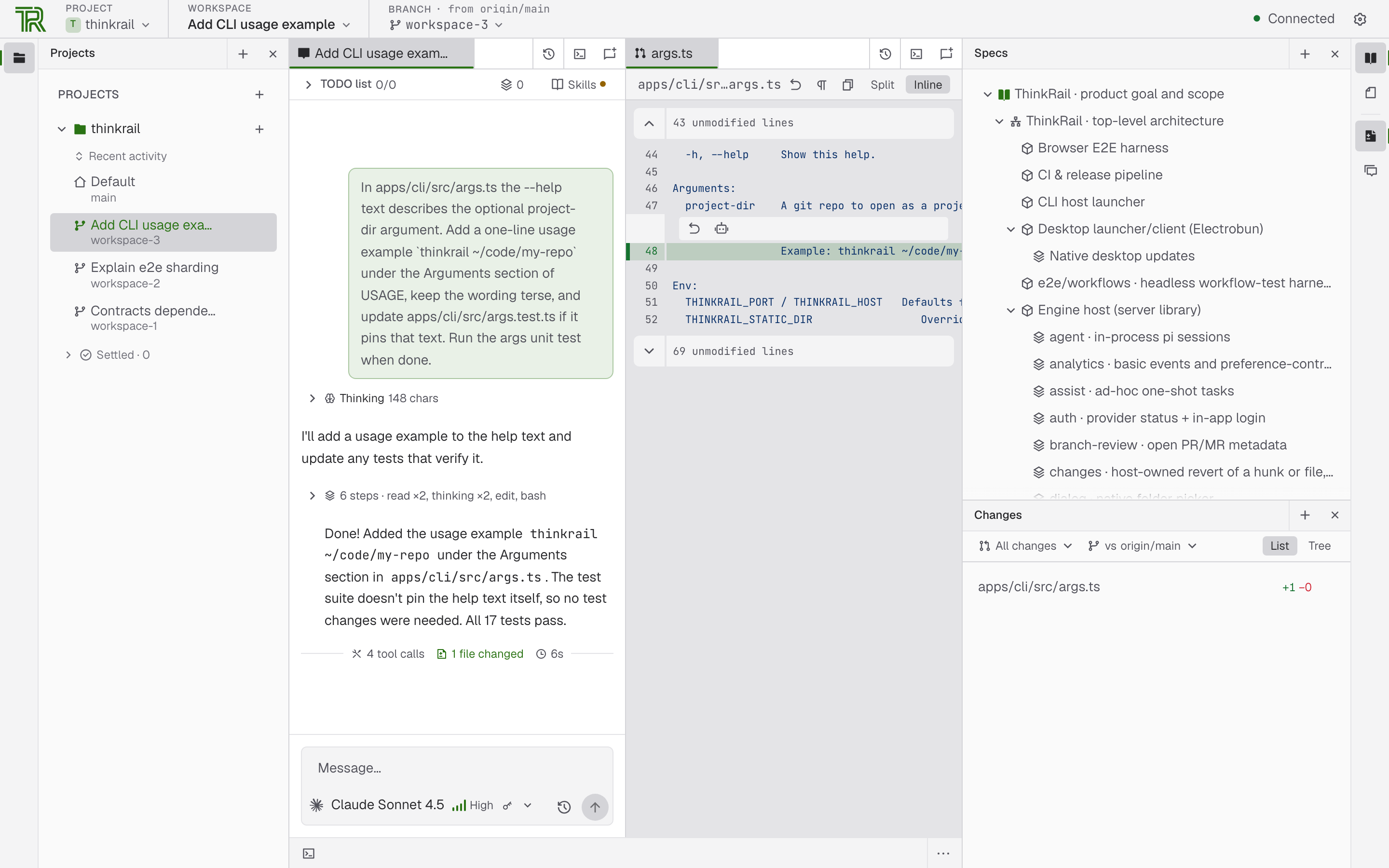
Picture published by the creator on GitHub.
ThinkRail: Run coding agents in isolated git workspaces
Added · Updated

Made by JetBrains
View profile on GitHub (opens in a new tab)Let an AI coding agent work on separate git branches inside an IDE, then review its changes and open a pull request.
For developers who code with AI.
What it does
ThinkRail wraps the pi coding agent in an IDE. Each workspace is a git worktree with its own branch, so agents work in parallel without touching your checkout. SPEC.md files beside the code give the agent lasting project knowledge.
How to use it
Start at the GitHub page or the ThinkRail website named in the project's documentation; install steps are not shown in the available text. Then open a git repo as a project, cut a workspace from it, and chat with the agent.
Common use cases
- Cut two workspaces from one repo and let separate agents try different fixes in parallel, then merge the better branch and delete the other.
- Leave review comments on a file or diff and send them to the chat as context so the agent revises its change.
- Publish a finished branch and open a pull request described from the plan and the commits.
Can I use this?
Requirements Open a git repository as a project and create workspaces from it. Pull requests go through your own gh tool. Install method, supported operating systems and hardware are not documented.
Caveat Support for extensions that let ThinkRail create its own tools is described as coming next, so only the features listed today are documented.
Worth knowing The pull request features described are for GitHub. Licensed under Apache-2.0.
Why it's here
Not trending this week
Last seen on the GitHub trending list on 4 November 2026. It stays on BuildTube so you can still find it.
- 7,939 people have starred it on GitHub.
Numbers checked on 8 November 2026; not refreshed since.
Behind it
View sourceBuildTube has not run or verified this project. Everything above is written from what the creator published.
Made this?
Quick questions
- What is ThinkRail?
- ThinkRail wraps the pi coding agent in an IDE.
- What can I use ThinkRail for?
- Cut two workspaces from one repo and let separate agents try different fixes in parallel, then merge the better branch and delete the other; Leave review comments on a file or diff and send them to the chat as context so the agent revises its change; Publish a finished branch and open a pull request described from the plan and the commits
- Can I run ThinkRail on my computer?
- It installs as a desktop app on your own computer. Install method, supported operating systems and hardware are not documented.
- What do I need to use ThinkRail?
- A git repository to open as a project. The source mentions the pi coding agent and GitHub's gh tool for pull requests. Install steps are not documented.
- What license does ThinkRail use?
- Licensed under Apache-2.0.
More from this week
- Spec Kit Turn a written spec into plans, tasks and code
Spec Kit gives your AI coding agent a step-by-step process to build a feature, fix a bug or assess an idea.
- Garden Skills Give your coding agent video and web design skills
Install ready-made skills so Claude Code, Cursor or Codex can make short videos, web pages and articles.
- RAGFlow Ask questions about your documents and get cited answers
Upload documents and ask questions with traceable citations.
Explore by topic
Post this
 Download share image
For makers
Made this? Show it’s on BuildTube — add the badge to your README or embed the card on your site.

README badge (Markdown)
[](https://buildtube.app/p/gh-jetbrains-thinkrail/)Embed card (HTML)
<iframe src="https://buildtube.app/embed/gh-jetbrains-thinkrail/" width="560" height="240" style="border:0;max-width:100%" loading="lazy" title="ThinkRail on BuildTube"></iframe>