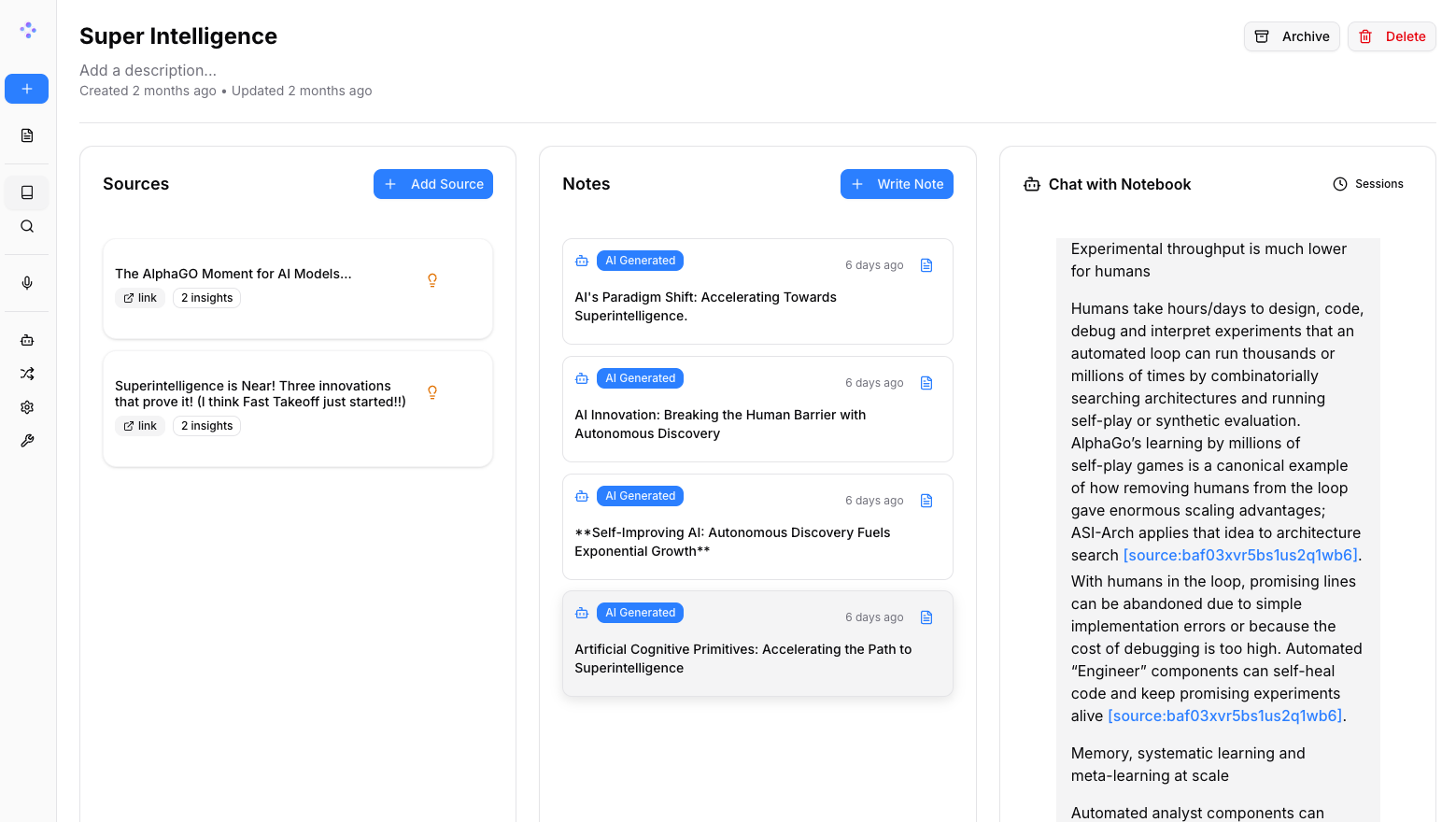
Picture published by the creator on GitHub.
Open Notebook: Chat with, search and make podcasts from research
Added · Updated

Made by Luis Novo
View profile on GitHub (opens in a new tab)Collect PDFs, videos and web pages, then search, chat and make podcasts from them.
For people doing research who want a private Notebook LM alternative.
What it does
Open Notebook is a self-hosted app made of a web interface, an API and a background worker, plus a SurrealDB database. You add sources such as PDFs, videos, audio and web pages, then search them, chat with answers that cite your sources, and generate podcasts. AI comes from 20+ providers or from local models.
How to use it
Download the official Docker Compose file, replace the encryption key line with your own long random secret, start the services and open the app in your browser on port 8502. In the sidebar under Models, add your provider's API key or a local Ollama address, add a language and an embedding model, then create a notebook.
Common use cases
- Add a PDF and a web page to a notebook and ask a question, and you get a chat answer that cites the sources and notes it used.
- Load your research sources and choose speaker profiles, and you get a generated podcast with one to four speakers discussing the material.
- Type a search across a notebook of videos, audio and documents, and you see full-text and vector search results from all your content.
Can I use this?
Requirements Requires Docker Desktop on macOS or Windows, or Docker Engine with the Compose plugin on Linux. For a fully local setup, add an Ollama service and download a chat and an embedding model; Anthropic and Groq offer no embedding models.
Caveat Licensed under MIT. On shared networks, set a password or limit the ports before starting. Local models run on your computer's processor unless you set up GPU access, and small models are noticeably slower than cloud ones.
Worth knowing There is no password by default and the app is reachable from other devices; you must add both a chat model and an embedding model.
Why it's here
Not trending this week
Last seen on the GitHub trending list on 7 November 2026. It stays on BuildTube so you can still find it.
- 41,761 people have starred it on GitHub.
Numbers checked on 8 November 2026; not refreshed since.
Behind it
View setup guideBuildTube has not run or verified this project. Everything above is written from what the creator published.
Made this?
Quick questions
- What is Open Notebook?
- Open Notebook is a self-hosted app made of a web interface, an API and a background worker, plus a SurrealDB database.
- What can I use Open Notebook for?
- Add a PDF and a web page to a notebook and ask a question, and you get a chat answer that cites the sources and notes it used; Load your research sources and choose speaker profiles, and you get a generated podcast with one to four speakers discussing the material; Type a search across a notebook of videos, audio and documents, and you see full-text and vector search results from all your content
- Can I run Open Notebook on my computer?
- It runs on your own computer or server after a local setup. Requires Docker Desktop on macOS or Windows, or Docker Engine with the Compose plugin on Linux. Local models run on your computer's processor unless you set up GPU access, and small models are noticeably slower than cloud ones.
- What do I need to use Open Notebook?
- Docker with Compose, plus an API key from an AI provider or a local model server such as Ollama; the local Ollama route asks for 8 GB of RAM or more.
- What license does Open Notebook use?
- Licensed under MIT.
More from this week
- DeepTutor Study your own documents with a personal AI tutor
Read documents with page-by-page citations, practice daily and get video lessons from an AI tutor.
- agent-desktop Let AI agents read and click desktop apps
For developers building computer-use agents: agent-desktop lets an AI agent read and operate desktop apps on Mac, Windows or Linux from a command line.
- Auto-Ontology Give AI agents checked business meanings for your database
Help AI agents answer questions about company databases using reviewed definitions and SQL, with each answer showing its steps.
Explore by topic
Post this
 Download share image
For makers
Made this? Show it’s on BuildTube — add the badge to your README or embed the card on your site.

README badge (Markdown)
[](https://buildtube.app/p/gh-lfnovo-open-notebook/)Embed card (HTML)
<iframe src="https://buildtube.app/embed/gh-lfnovo-open-notebook/" width="560" height="240" style="border:0;max-width:100%" loading="lazy" title="Open Notebook on BuildTube"></iframe>