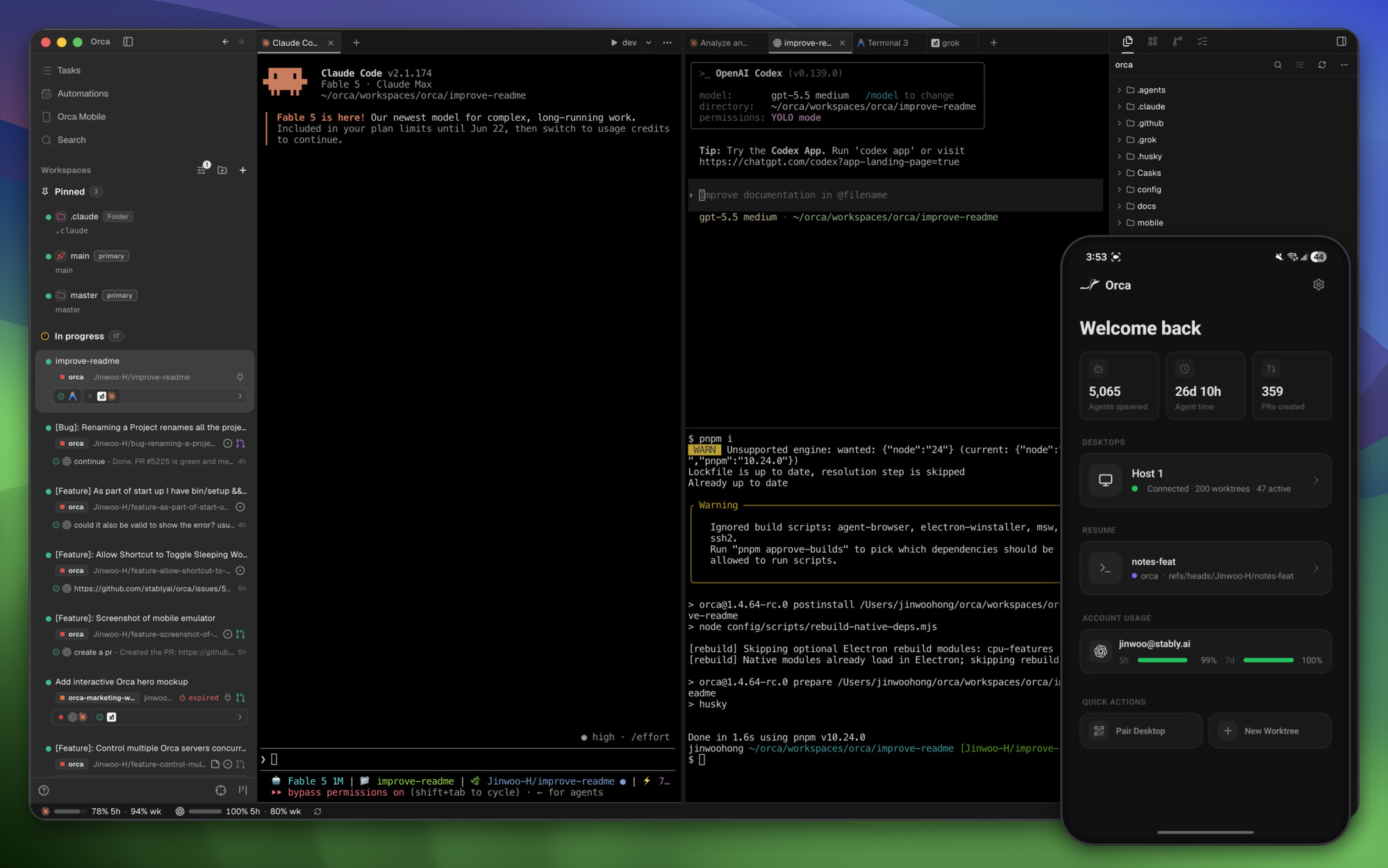
Picture published by the creator on GitHub.
Orca: Run several coding agents side by side and compare them
Added · Updated

Made by Stably
View profile on GitHub (opens in a new tab)A desktop app that runs more than one AI coding agent at a time, each in its own separate copy of your project, so you can send the same request to all of them and keep the answer you like best.
A companion phone app lets you check on them while away.
What it does
It gives each agent its own isolated checkout of your project, so their edits never collide, and shows all of them in one window with terminals, a file editor and the project’s pull requests and issues. You can fan one prompt out across several agents and compare what each produced before merging one. It can also run agents on a remote machine over SSH, and comment on individual lines of an agent’s changes to send feedback back to it.
You could use it to…
- Send one prompt to several coding agents and compare results
- Check on running agents from a companion phone app
- Keep each agent working in its own isolated project copy
Can I use this?
You'll need A desktop computer, Git and your own agent subscriptions · Setup needed
Worth knowing You bring your own accounts for the agents it runs, so their costs stay with you. Running several agents at once uses more of your machine and makes more changes to keep track of. Licensed under MIT.
Why it's here
Not trending this week
Last seen on the GitHub trending list on 7 November 2026. It stays on BuildTube so you can still find it.
- 118,983 people have starred it on GitHub.
Numbers checked on 8 November 2026; not refreshed since.
Behind it
View setup guideBuildTube has not run or verified this project. Everything above is written from what the creator published.
Made this?
Quick questions
- What is Orca?
- It gives each agent its own isolated checkout of your project, so their edits never collide, and shows all of them in one window with terminals, a file editor and the project’s pull requests and issues.
- What can I use Orca for?
- Send one prompt to several coding agents and compare results; Check on running agents from a companion phone app; Keep each agent working in its own isolated project copy
- Can I run Orca on my computer?
- It installs as a desktop app on your own computer.
- What do I need to use Orca?
- A desktop computer running the app, Git, and your own subscriptions to the coding agents you want it to drive, such as Codex, Claude Code, OpenCode or Pi. The phone companion is a separate download.
- What license does Orca use?
- Licensed under MIT.
More from this week
- Stroq Check AI coding agent sessions for leaked keys
Stroq scans your recent Claude Code and Codex sessions for keys that left your machine.
- agent-desktop Let AI agents read and click desktop apps
For developers building computer-use agents: agent-desktop lets an AI agent read and operate desktop apps on Mac, Windows or Linux from a command line.
- DeepTutor Study your own documents with a personal AI tutor
Read documents with page-by-page citations, practice daily and get video lessons from an AI tutor.
Explore by topic
Post this
 Download share image
For makers
Made this? Show it’s on BuildTube — add the badge to your README or embed the card on your site.

README badge (Markdown)
[](https://buildtube.app/p/gh-stablyai-orca/)Embed card (HTML)
<iframe src="https://buildtube.app/embed/gh-stablyai-orca/" width="560" height="240" style="border:0;max-width:100%" loading="lazy" title="Orca on BuildTube"></iframe>