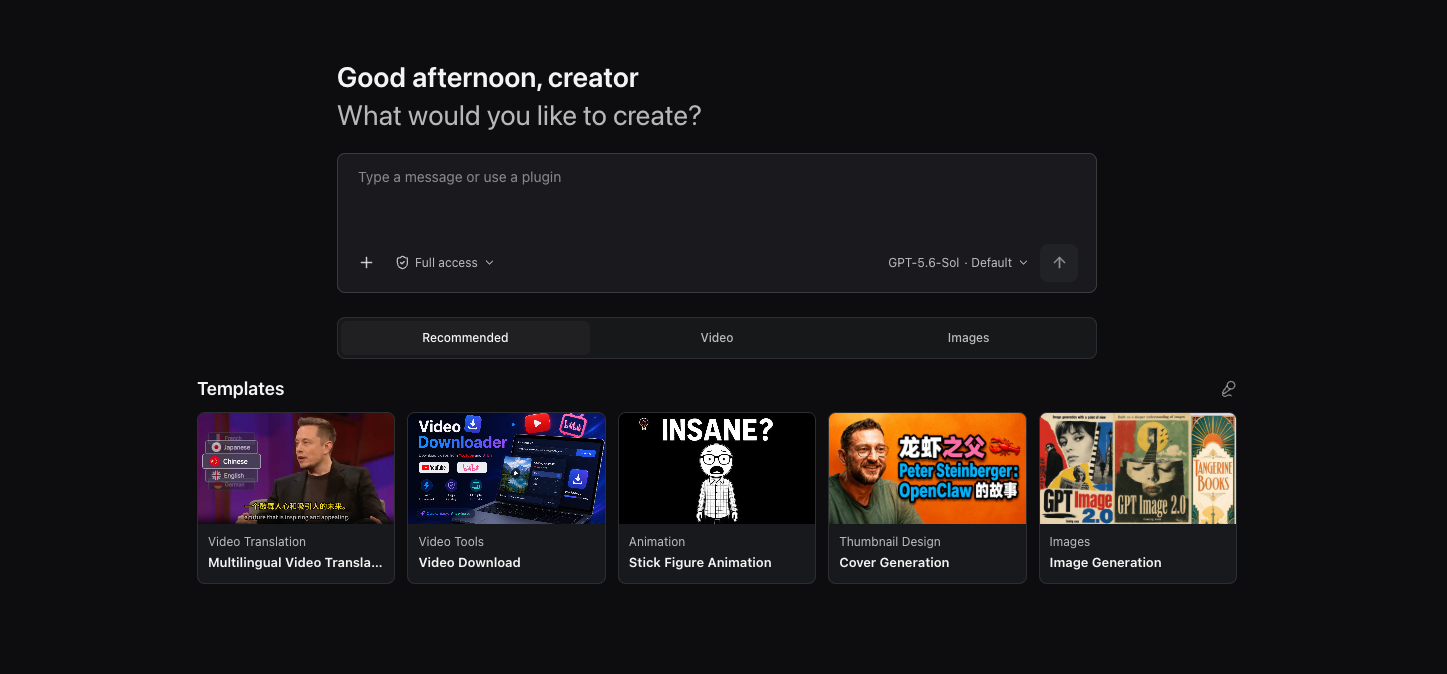
Picture published by the creator on GitHub.
Write, dub, translate, and clip video in an AI creator workspace

Made by Joshua Yin Junxi
View profile on GitHub (opens in a new tab)OpenCreator (formerly KrillinAI) is a desktop app that bundles AI creator tools into one workspace: write articles or short-video scripts, generate images and video from a prompt (through models like Seedance, Kling, or GPT Image), add AI voiceovers and dubbing, translate and re-subtitle existing videos, and turn a script into a narrated stick-figure animation.
It also downloads and analyzes public videos from YouTube, TikTok, Bilibili, and other platforms to compare formats before you commit. It installs as a Mac or Windows app, includes the Codex coding agent under the hood, and needs a Codex login plus API keys for whichever image, video, or voice models you use.
You could use it to…
- Write, dub, translate and clip video in one workspace
- Turn a script into a narrated stick-figure animation
- Compare video formats across YouTube, TikTok and Bilibili first
Can I use this?
You'll need A Mac or Windows computer, a Codex login, and model provider keys · Setup needed
Worth knowing Some platform downloads (Xiaohongshu, Pinterest) depend on public link formats that can change or expire, and the app does not import your browser's login cookies automatically. Apache-2.0 licence. BuildTube has not run or verified this software.
Why it's here
Not trending this week
Last seen on the GitHub trending list on 28 September 2026. It stays on BuildTube so you can still find it.
- 12,605 people have starred it on GitHub.
Numbers checked on 6 October 2026; not refreshed since.
Behind it
See the code on GitHubBuildTube has not run or verified this project. Everything above is written from what the creator published.
Made this?